Auto-Sync Knowledge helps keep your chat up to date with the latest information available in your linked sources. This makes maintaining your knowledge base much simpler, faster and more efficient.

How does it work?

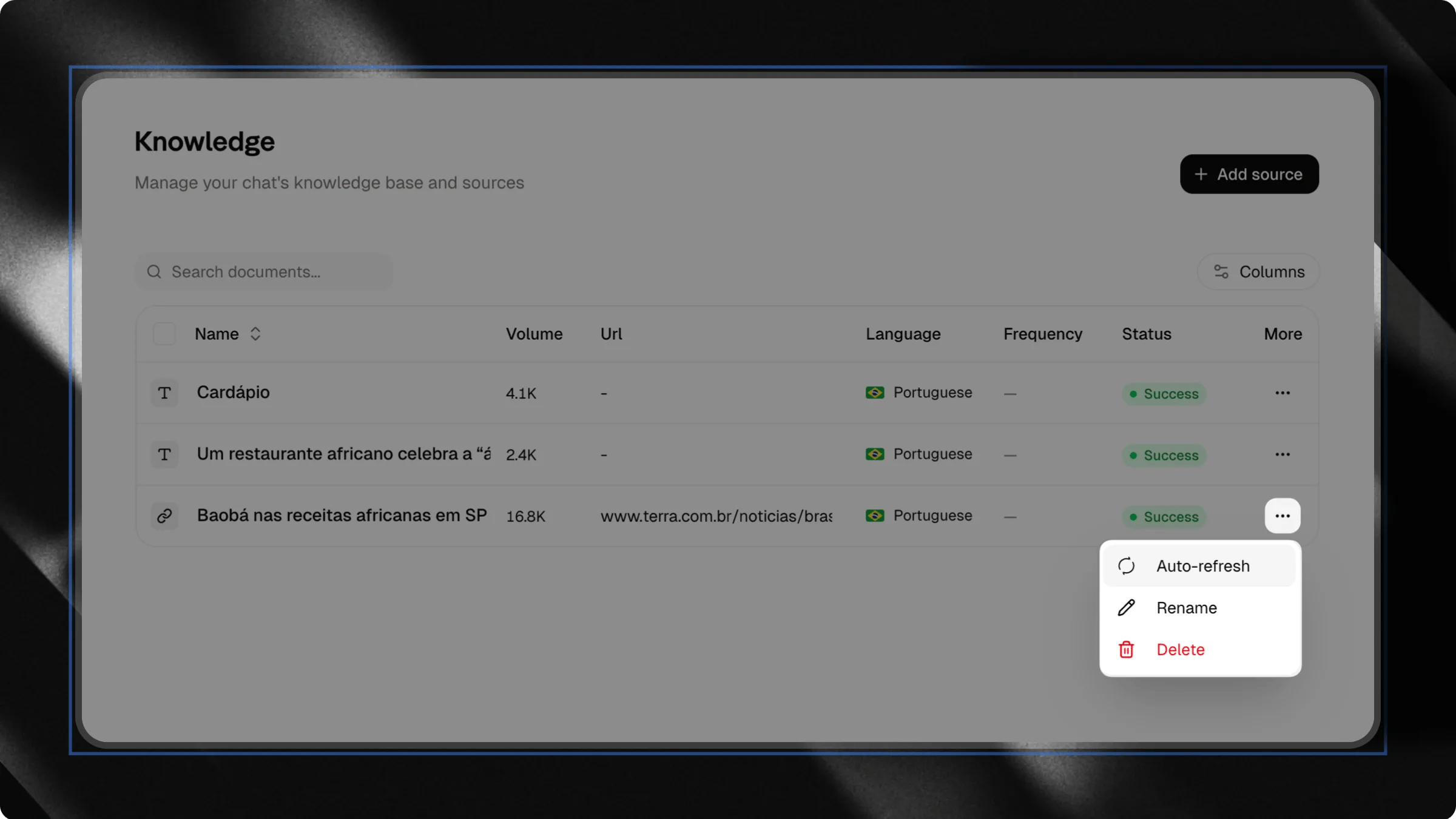
Every Link source includes an Auto-Sync option. When triggered, Attlas revisits the original page, extracts the updated content and retrains your chat using the most recent information available. This allows your chat’s knowledge to be refreshed in just a few seconds.
To access Auto-Sync options, click the three-dot menu (⋮) next to the knowledge source.
Auto Sync 1

Example

Imagine you have a blog article containing information about your products. A few weeks later, you update the article. Without Auto-Sync, you would need to:
  1. Remove the old link;
  2. Add the link again;
  3. Wait for a new training process.
With Auto-Sync, simply click Auto-Sync and Attlas will update that source using the latest version of the page.

Scheduled automatic refresh

In addition to manual synchronization, Auto-Sync can also run automatically. Auto Sync By configuring a refresh frequency, Attlas will periodically revisit the page, extract updated content and retrain your chat without requiring any manual action. Available options include:
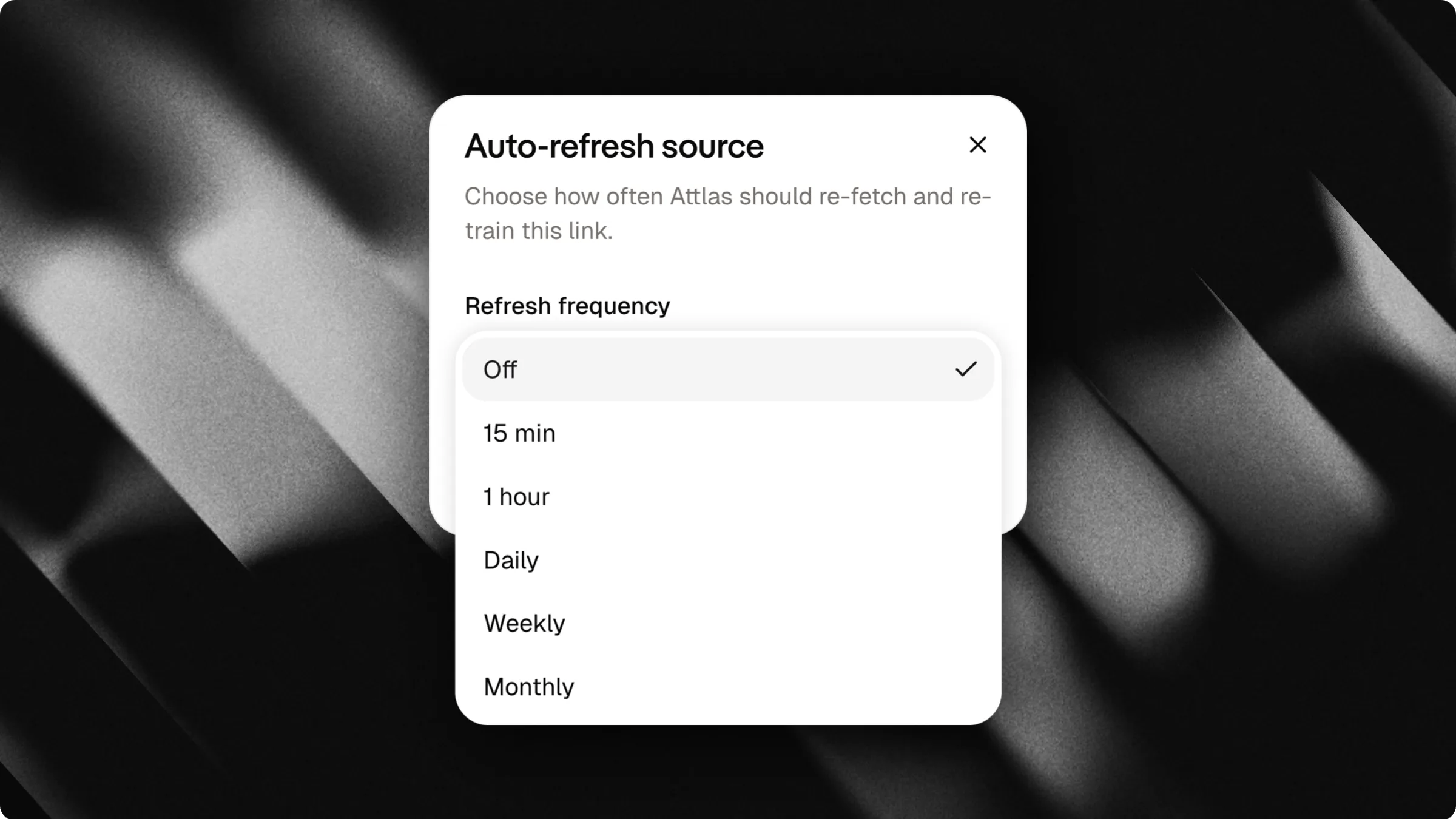
  • Off
  • Every 15 minutes
  • Every hour
  • Daily
  • Weekly
  • Monthly
This is especially useful for content that changes frequently and needs to stay up to date.

Example

Imagine a pricing page, product documentation, or help center that receives regular updates. By setting a daily or weekly refresh schedule, Attlas will automatically keep its knowledge aligned with the latest content published on your website. This means you no longer need to manually update each source whenever changes are made.

When should you use Auto-Sync?

Auto-Sync is recommended for any content that may change over time. Common examples include:
  • Blog articles;
  • Product pages;
  • Documentation;
  • Company pages;
  • Knowledge bases;
  • FAQs.
Whenever information changes, Attlas can re-sync the source to keep your chat up to date.

Who benefits most from this feature?

While anyone can use Auto-Sync, it is especially valuable for:

Content creators

If you regularly publish articles, tutorials, or educational content, Auto-Sync helps your chat stay aligned with your latest updates.

Businesses

Companies frequently update product pages, policies, documentation and company information. Auto-Sync ensures your chat stays synchronized with those changes.

Support teams

Help centers and knowledge bases are constantly evolving. With Auto-Sync, your chat responses remain aligned with your official documentation.

Educators and course creators

Courses, learning materials and educational resources often evolve over time. Auto-Sync makes it easy to keep your chat updated with the latest information.

Keep your knowledge up to date

An intelligent chat depends on accurate and up-to-date information. With Auto-Sync, your links become living knowledge sources that evolve alongside the original content. You can manually refresh pages whenever needed or fully automate the process with scheduled updates. This reduces maintenance work, prevents outdated information and ensures your chat continues learning from the latest versions of your content. The more up-to-date your sources are, the better your chat’s responses will be.
Last modified on July 17, 2026