

Automatic evaluation of responses
Every message sent by your chatbot automatically receives a score from 0 to 100, visible in the Conversations view. This score measures the quality of the response from the user’s perspective: did they get what they were looking for? The overall coverage rate shown in your dashboard is the average of these individual evaluations.How to read the scores
- 🟢 Green (85 to 100), The response is direct, accurate and helpful. The user obtained the information they were looking for.
- 🟠 Orange (50 to 84), The response is partially helpful. This may indicate that an off-topic question was correctly declined, or that a relevant response lacked precision on an important aspect.
- 🔴 Red (0 to 49), The user left without a satisfying answer. Either the chatbot did not have the necessary information, or the response did not match the question asked.
Understanding the reasoning
Click on any score to display a short explanation detailing why that grade was assigned and which aspect of the response influenced the decision. This is your starting point for identifying exactly what needs to be improved.Improving your chatbot using scores
Red scores are the most valuable to review. When analyzing them, there are two main scenarios to consider:- The question was within scope, but the information was missing → This is content you need to add to your knowledge base. The more you enrich the knowledge base, the more your overall coverage rate will increase.
- The question was off-topic → The chatbot behaved correctly. No action is required.
Focus on satisfaction, not politeness: The score evaluates user satisfaction, not the politeness of the bot. A response like “I don’t have this information”, even if politely and perfectly formulated, is never considered a good response if the question was legitimate.
How to use this metric to your advantage
The coverage rate is more than just a number, it is a practical tool for continuously improving your assistant.1. Monitor the rate in analytics
Track your overall coverage rate regularly in the overview dashboard to identify trends.2. Review evaluator feedback
Check the explanations and comments provided by the evaluator alongside each score.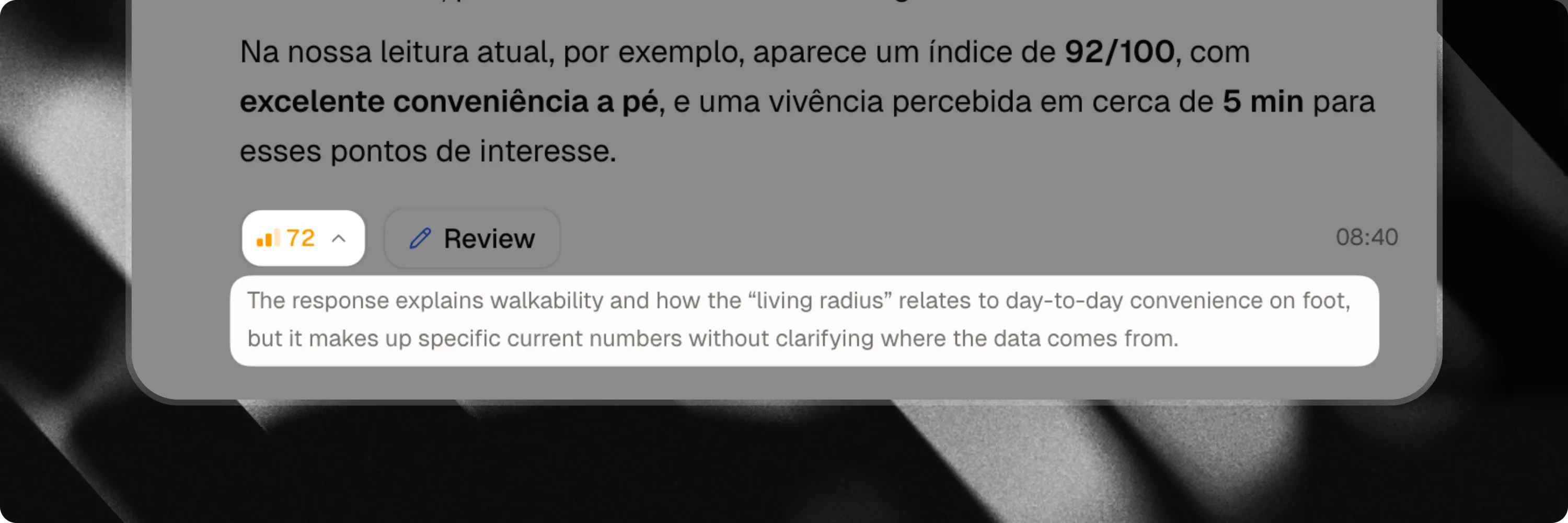
3. Add or improve content
Update your knowledge base so your chat can respond more clearly, accurately and contextually to previously failed questions.4. Correct low-rated responses
Visit the Corrections section and review the questions and answers that received low coverage scores. Provide improved responses and additional context so future answers become more accurate.Learn more about the Corrections feature
Corrections is available exclusively on the Attlas PRO plan.