Quoi de neuf depuis votre dernière visite

Découvrez les dernières mises à jour, fonctionnalités à venir et améliorations produit prévues sur la feuille de route Attlas. Restez informé de ce qui est nouveau et de ce qui arrive.

Restez informé

improvement
26 mars 2026

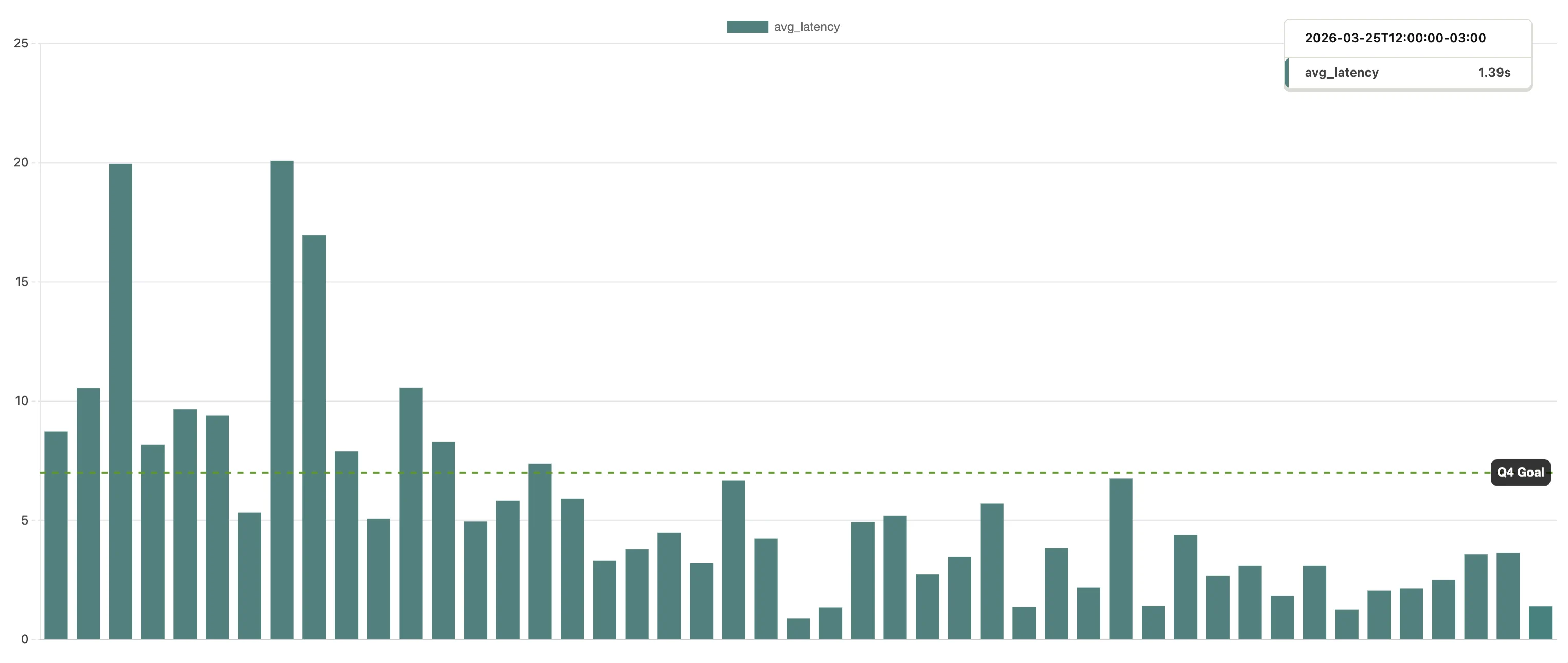
6x faster responses

This image displays a bar graph illustrating average latency over time. The x-axis represents a time series, while the y-axis shows latency values measured in seconds. Vertical bars indicate fluctuations in average latency, with a dotted horizontal line marking the goal latency threshold. The overall trend demonstrates varying latency levels, highlighting periods of significant performance dips and peaks. This visualization can be useful for identifying patterns in system performance metrics.

The new implementation cuts response time by more than 6x. Concretely, your audience no longer waits for the page to "think" before it responds.

Chat used to take around 20 secs to start answering — now it's under 2 secs.

performance
12 mars 2026

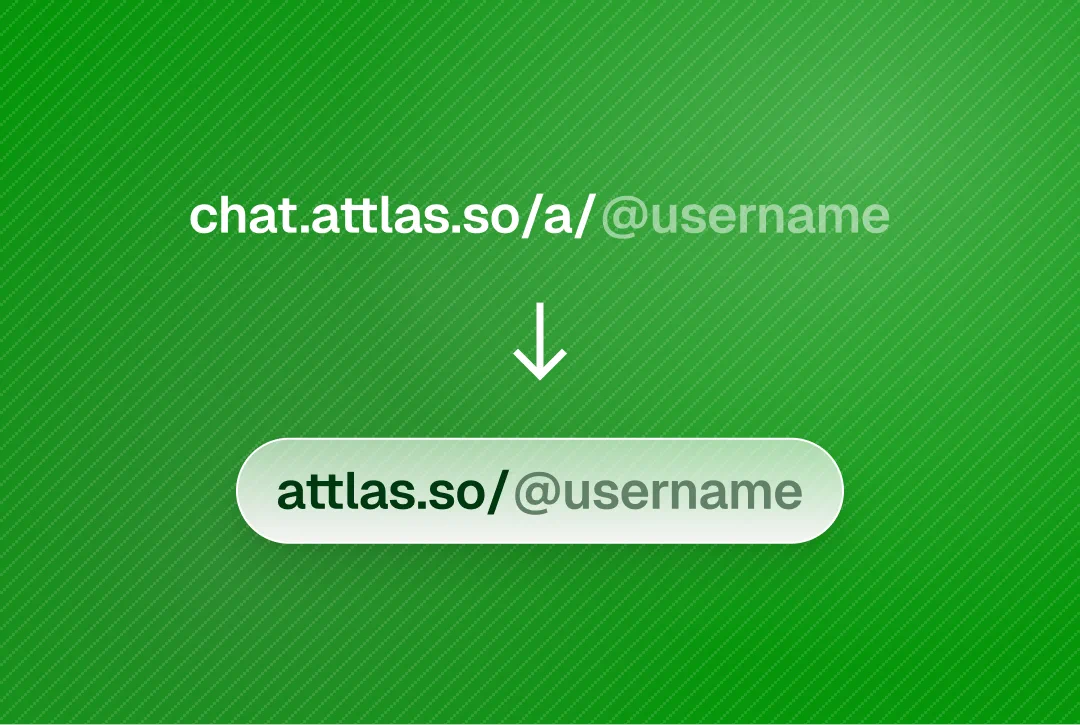
✨ Cleaner chat links

The image features a vibrant green background with subtle diagonal stripes. At the top, it displays the URL "chat.attlas.so/a/@username" in white text, indicating a chat-related web link. Below, an arrow points downward toward a simplified version of the link, formatted as "attlas.so/@username," which appears in a gray box. This visual emphasizes the ease of accessing user-specific chats on the Attlas platform.
  • chat.attlas.so/a/@usernameattlas.so/@username
  • Shorter. Sharper. Easier to share
Update your link in bio: If you're using your chat link in your bio, now's a good time to update it to attlas.so/@username.

Old links already redirect automatically to the new optimized page.

performance
3 mars 2026

Auto sync for link sources

An icon representing the "Auto-Sync" feature, set against a warm orange gradient background. The icon consists of a circular design with two arrows forming a loop, symbolizing synchronization. Below the icon, the text "Auto-Sync" is displayed in a clear, modern font, emphasizing the automatic syncing functionality of the Attlas platform.

You can now enable Auto Sync for link-based knowledge sources

If one of your knowledge sources is a URL, Attlas can automatically re-read and update the content whenever the original page changes — no manual re-upload required.

How it works

When Auto Sync is enabled, Attlas periodically checks the original link.

If the content has been updated, the chat automatically reprocesses the information and refreshes its knowledge base.

Custom Sync Frequency

You can choose how often Attlas checks for updates:

  • Every 15 minutes
  • Every hour
  • Daily
  • Weekly
  • Monthly
  • Or keep it turned off
feature
11 février 2026

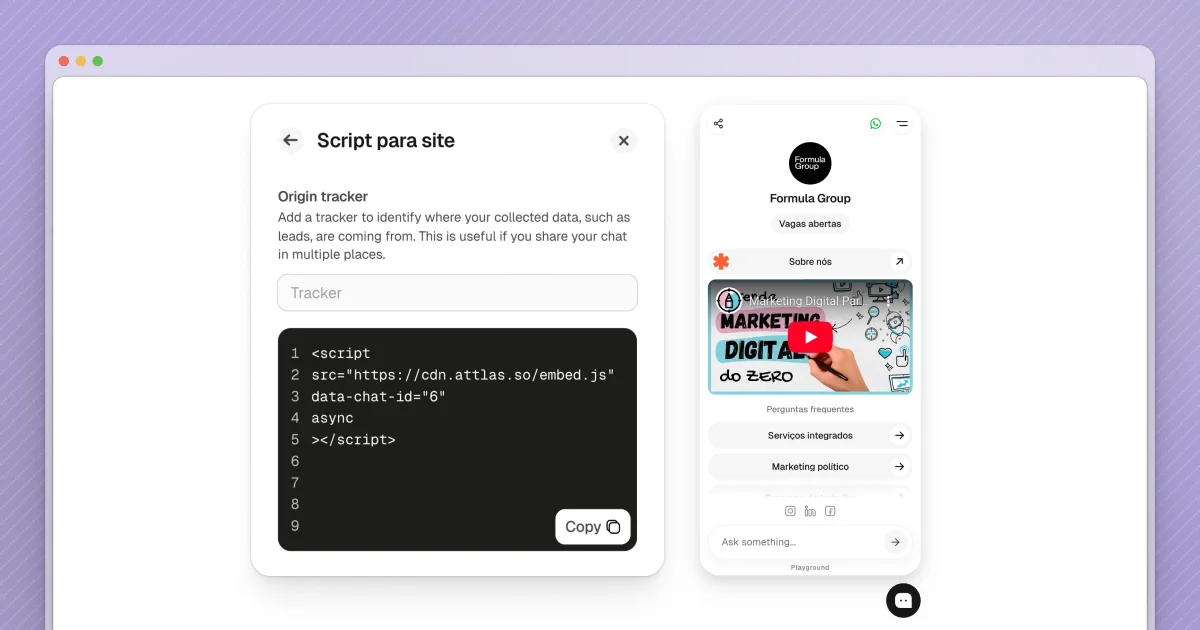
Script for live site

The image showcases a user interface from the Attlas platform, featuring a script section for integrating an origin tracker. On the left, a code snippet is displayed in a text box, instructing users to copy it for embedding purposes. The right side of the screen presents a mobile view labeled "Formula Group," displaying a digital marketing chat interface with a video thumbnail. The overall layout highlights the ease of customizing AI chat integrations for users.

Embedding Attlas into websites is now even easier.

We’ve released a new version of the Attlas Script, designed to work on any web page — including Notion pages.

What’s new:

  • Lightweight and simple script to embed your chat anywhere
  • Origin Tracker to identify where conversations and leads are coming from
    • Perfect if you share the same chat across multiple pages or platforms

With Origin Tracker, you gain visibility into which pages generate the most engagement, without needing multiple chats.

More context, better insights, and frictionless installation.

improvement
10 février 2026

Sharing conversations

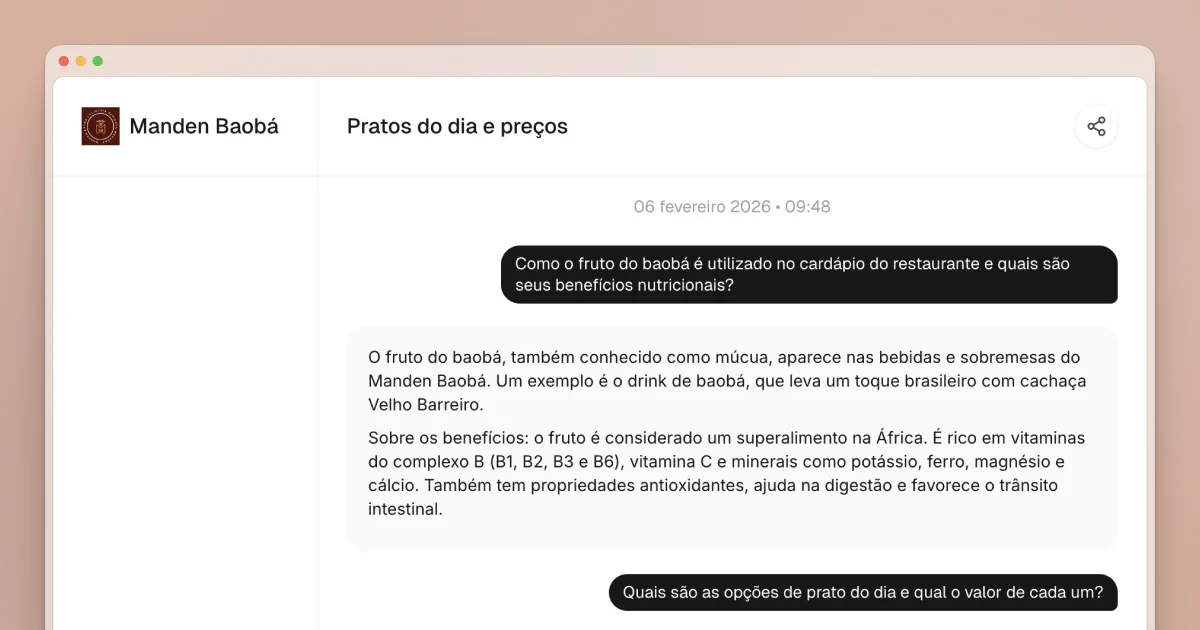
The image shows a sleek interface of the Attlas SaaS platform, featuring a chat window titled "Manden Baobá" with the date "06 fevereiro 2026" and time "09:48." The conversation discusses the nutritional benefits of baobab fruit, referring to its use in restaurant menus and health properties. The chat's design highlights user-friendly communication, emphasizing the platform's capability for personalized AI interactions based on specific data.

You can now share Attlas conversations with ease.

Simply copy the link available at the top of each conversation or choose a sharing option, such as WhatsApp and other platforms.

feature
6 février 2026

🎨 New Theme editor

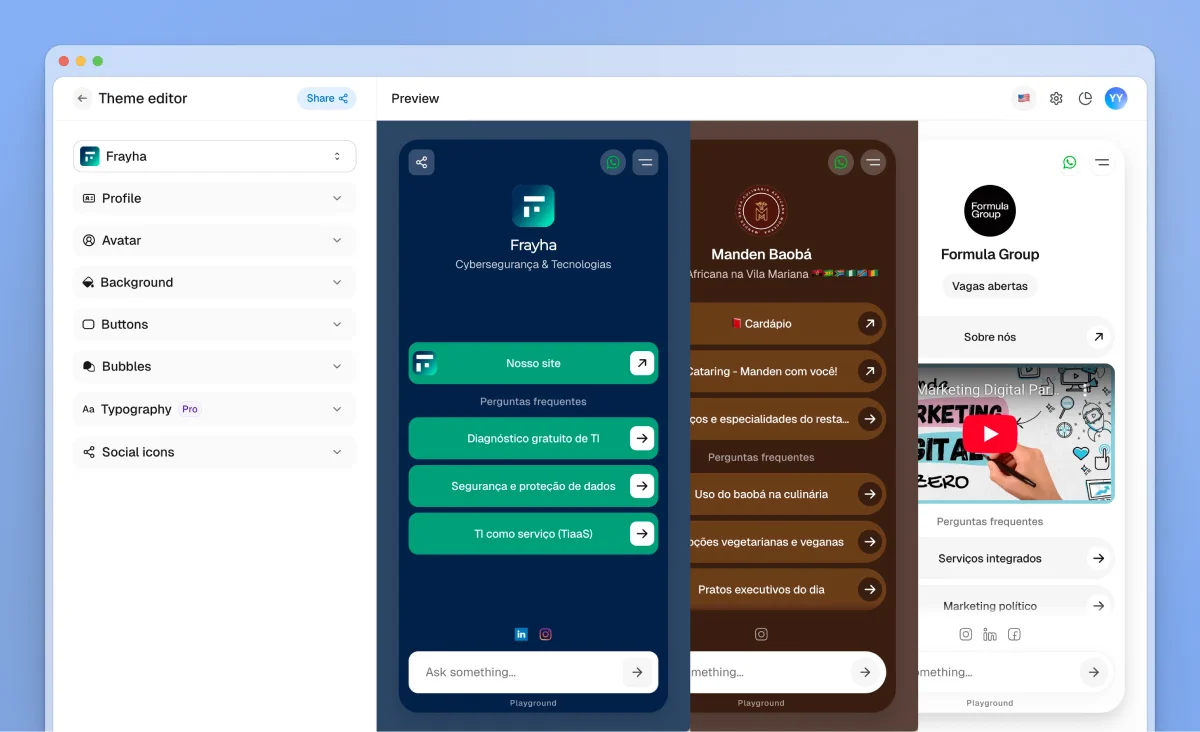
The image showcases the Attlas platform's theme editor interface for creating personalized AI chat experiences. On the left side, the settings menu includes options for profile customization, background, fonts, and social icons. The preview area features three distinct chat themes: "Frayha," presented in blue with options for user interaction, "Mandlen Badok," highlighted in brown, and another chat option related to "Formula Group," which includes engaging content and visual elements. The layout emphasizes ease of customization and user-friendly design for building AI-driven chats.

This page includes a complete visual customization space, giving you more control over how your chat looks and feels — and helping you better align it with your brand.

The Themes page was created to help you shape the visual identity of your chat and build a more dynamic, personalized, and engaging environment, without adding complexity.

You can now customize:

  • Chat bubble colors & style
  • Background colors & style
  • Text colors
  • Avatar style
  • Button colors & style
  • Typography
  • Social media icons
  • And more…
feature
27 janvier 2026

YouTube and social media video support
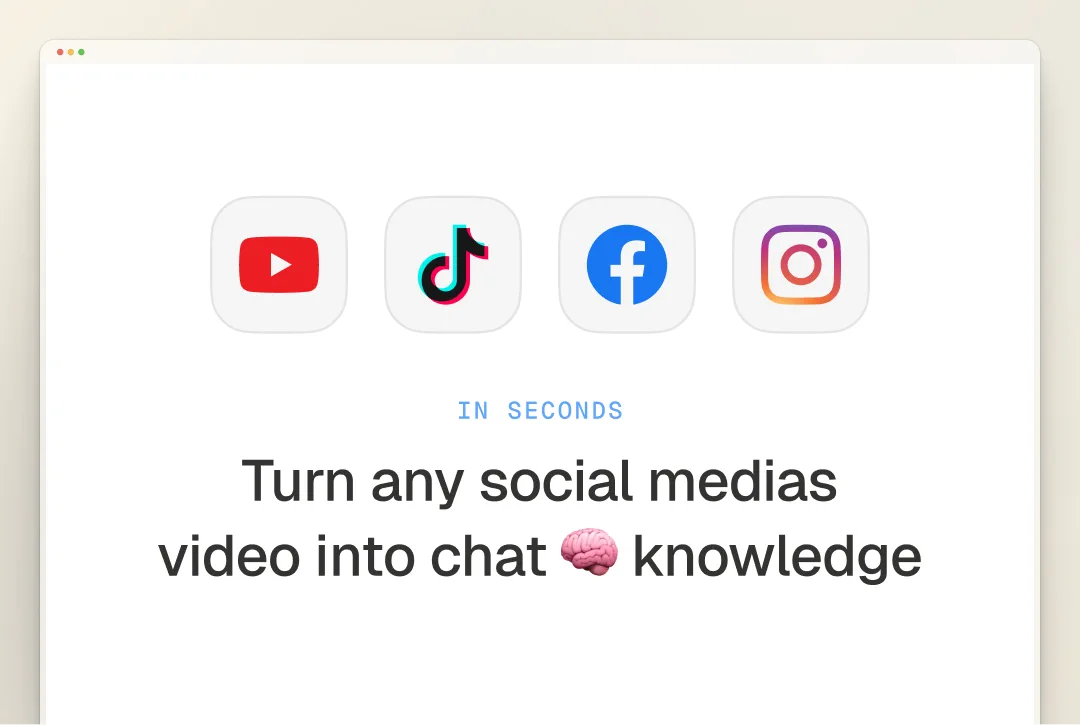
A minimalist design featuring popular social media platform icons: YouTube, TikTok, Facebook, and Instagram. Below the icons, bold text reads: "Turn any social media video into chat knowledge" with an emphasis on the word "knowledge" represented by a brain emoji. The background is light-colored, enhancing the clarity of the message.

🎥 Turn social media videos into chat knowledge

You can now paste video URLs from YouTube, Instagram, TikTok, and Facebook directly into Attlas. The video content is automatically transcribed and added to your chat's knowledge base — in seconds.

Perfect for:

  • Product demos and tutorials
  • Customer testimonials
  • Educational content
  • Any video content you want your chat to reference
🟪
This feature is available on the Attlas PRO plan.
feature
16 janvier 2026

Audio files as sources

An icon representing an audio or voice feature, featuring a sound wave graphic in black on a light blue background with a subtle gradient. The design is simple and modern, emphasizing the technological aspect of audio processing. This image is intended to illustrate voice capabilities within the Attlas platform.

You can now upload audio files as sources in Attlas.

Meetings, interviews, voice notes, and recordings are automatically transcribed and transformed into text, becoming part of your chat’s knowledge base.

improvement
15 janvier 2026

Trigger questions generator

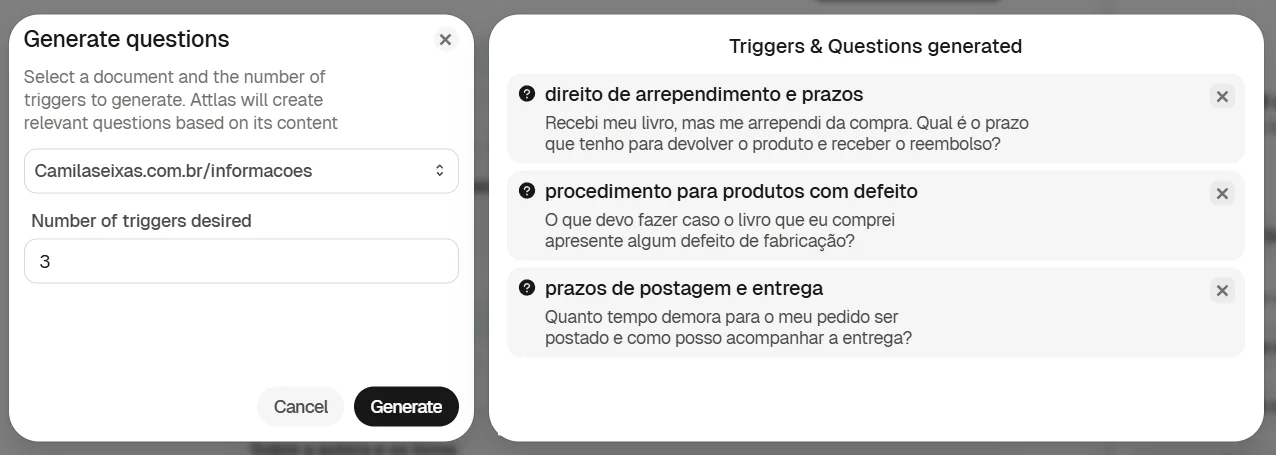
Attlas interface showing the automatic generation of trigger questions. On the left, a "Generate questions" modal where the user selects a source, defines the number of questions, and clicks "Generate." On the right, the "Triggers & Questions generated" screen displays three automatically created questions related to deadlines, returns, and product defects.

You can now generate trigger questions directly from your sources.

Just go to the Triggers tab, click on Generate questions, select the source you want to use, choose how many questions you’d like, and click Generate.

All questions are automatically added to the main Attlas interface and can be tested instantly in the Playground.

feature
9 janvier 2026

Batch Mode

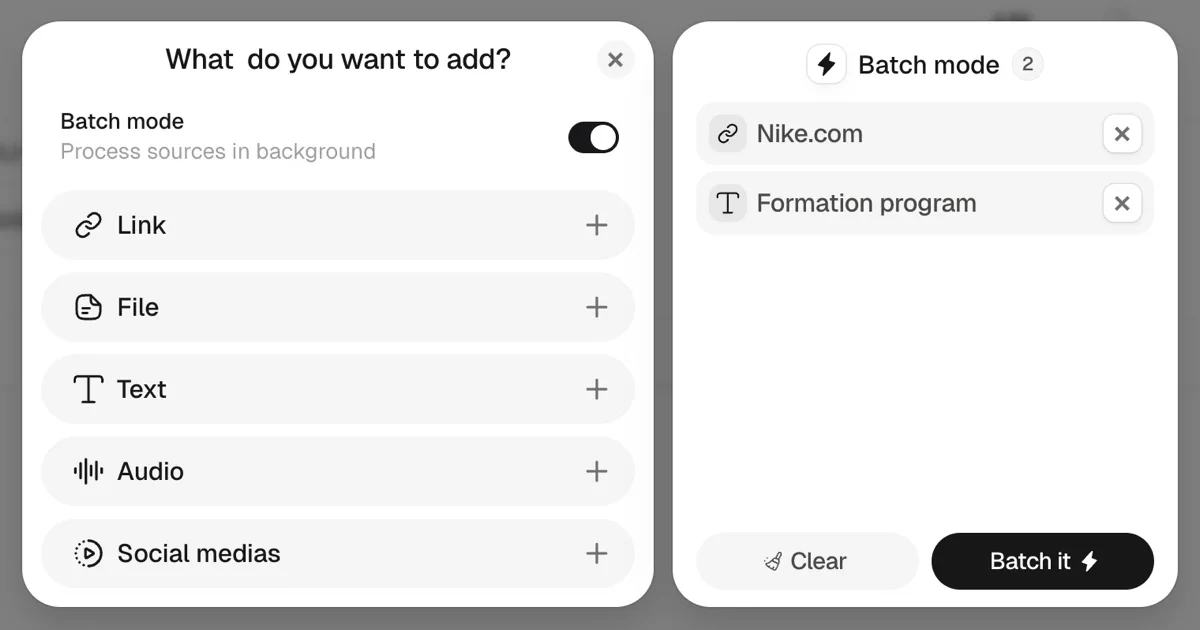
The image displays the user interface of the Attlas platform, highlighting the "Batch mode" feature. On the left side, there are options to add various data types, including links, files, text, audio, and social media sources. The right side shows a list where users can manage added items, such as "Nike.com" and "Formation program," with a clear button and the action button labeled "Batch it." The overall design is sleek and modern, emphasizing ease of use for creating AI chats from diverse data sources.

Batch Mode is available in the sources tab.

With it, you can upload multiple sources at once—including different formats such as links, PDFs, and texts—without having to send each item separately.

Batch Mode is a feature exclusive to the Attlas Pro plan.
deprecated
5 janvier 2026

Forms and submissions updates

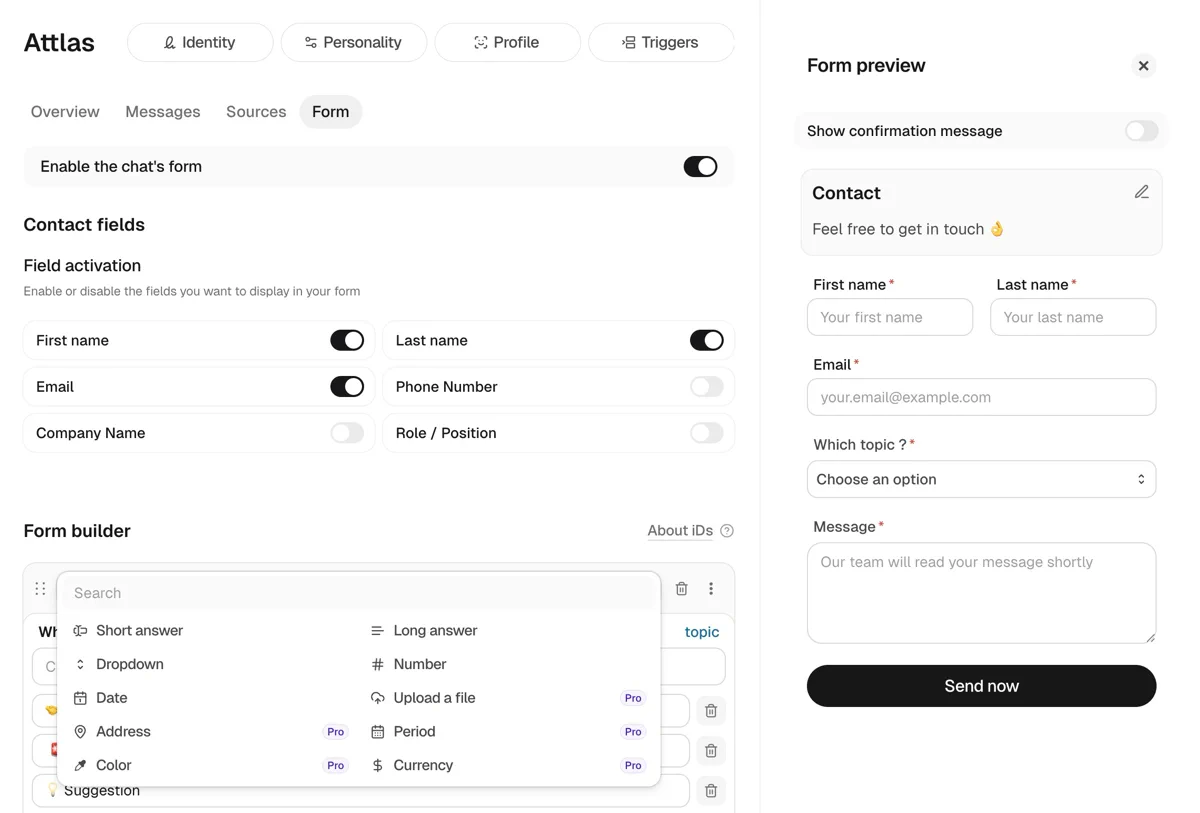
Attlas interface showing the chat form configuration. On the left, the form editor displays options to enable the form, select contact fields such as first name, last name, email, and phone number, and a form builder with different question types (short answer, long answer, dropdown, file upload, and more). On the right, a live form preview shows the final form with contact fields, a topic selector, a message field, and a “Send now” button.

📝 More flexible lead capture forms

Lead capture forms are now even more customizable.

You can create custom fields based on what you need to collect, making each form adapt perfectly to your use case.

📊 New Submissions tab

We’ve added a new Submissions tab at the top of the platform.

This area stores all contacts and data submitted through your forms, and also tracks multiple submissions from the same user — allowing you to manage one contact with several entries in one place.

improvement
29 décembre 2025

Multilingual chat: 29 languages, zero configuration
The image features a light purple background with a circular icon in the center, displaying a stylized letter "A" alongside a character representing a language symbol. Below the icon, the text reads "29 languages. Zero setup." This design emphasizes the platform's multilingual capabilities and ease of use, making it appealing for users seeking an accessible AI chat solution.

Attlas now detects source languages automatically and works natively across 29 languages — no primary language to define, no translations forced. Your chat learns and responds in the language of your content and your visitors.

improvement
20 décembre 2025

Add new content to your trigger buttons!
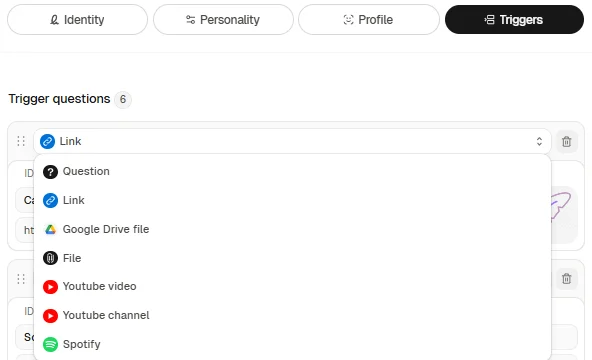
Attlas interface showing the content options available for trigger buttons, including link, question, Google Drive file, file, YouTube video, YouTube channel, and Spotify music.

Trigger buttons are designed to encourage interaction with your chat and content!

All available options are:

  • Question: write the trigger label and the actual question the chat should answer.
  • Link: paste the link to your store, website, or any other relevant page.
  • Google Drive file: insert the shared link to your Google Drive file or document.
  • File: upload a file directly to the Attlas platform.
  • YouTube video: include relevant videos to enrich the content.
  • YouTube channel: connect your YouTube channel so users can easily access it.
  • Spotify: share your favorite songs or playlists.
improvement
1 décembre 2025

✨ Attlas V3 is launched !

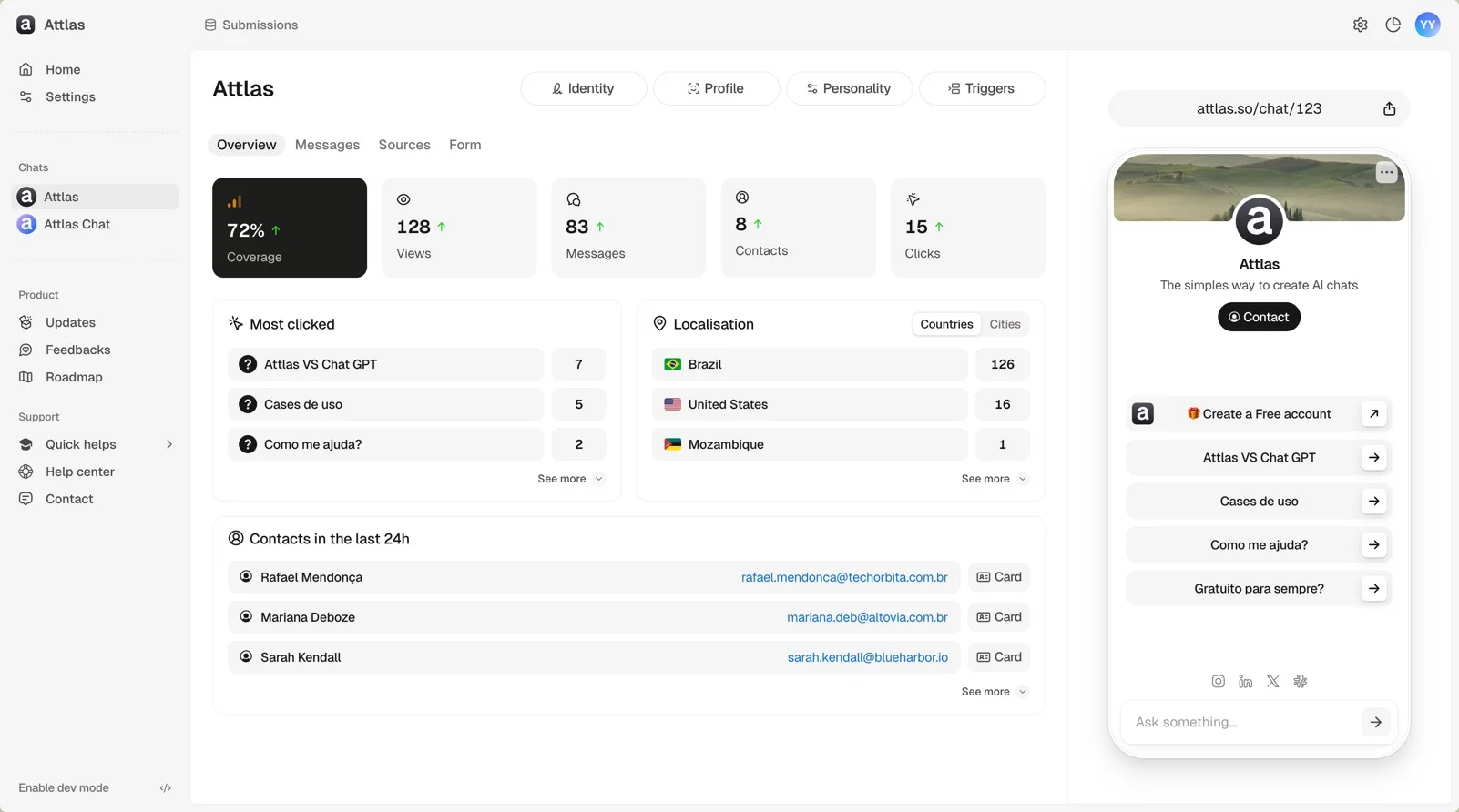
An interface of the Attlas SaaS platform showcasing a dashboard overview. Key metrics include 72% coverage, 128 views, 83 engagements, and 15 clicks. Sections highlight the most clicked sources, geographical localization with countries listed, and recent contacts. A sidebar displays user profiles with card details for each contact. The right side features an AI chat demonstration. Overall, the design emphasizes user engagement and data analytics in a clean, modern layout.

The new version of Attlas is now live—completely rethought, redesigned, and much more powerful. Here's what you'll find:

  • New interface, more organized, intuitive, and faster.
  • Separate environments for each feature, making everything clearer and easier to use.
  • Corrections tab: now you can review and adjust messages with one click.
  • Three languages available: Portuguese, English, and French.
  • Customized chats: add buttons with trigger questions, links, and even videos.
  • Smart buttons in chat: designed to encourage clicks and deepen the conversation.
  • Internal forms to capture leads directly on the platform.

...and many other new features that you will only discover by exploring V3.

Welcome to the next level. 🚀

deprecated
9 septembre 2025

Notion integration is here!

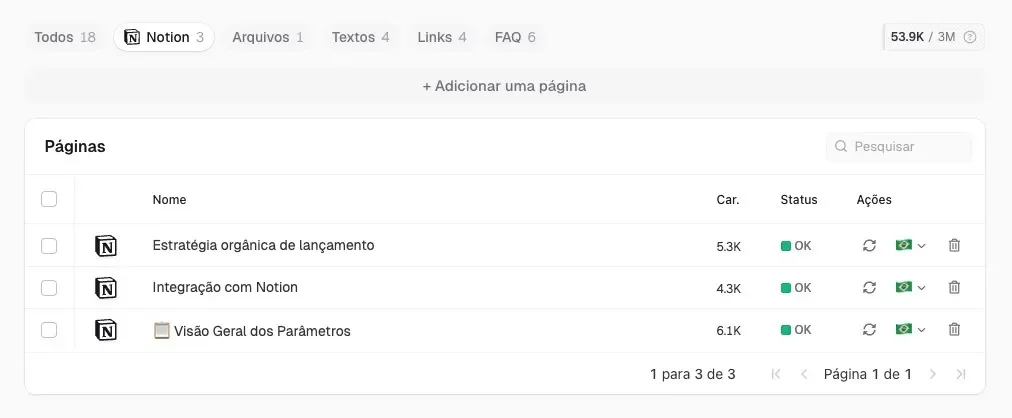
Screenshot of the Attlas SaaS platform interface displaying a list of pages. The pages include titles like "Estratégia orgânica de lançamento," "Integração com Notion," and "Visão Geral dos Parâmetros," along with their respective character counts and status indicators. The interface features a clean design with options for searching and adding new pages.

Attlas now has its first official integration: Notion.

With it, you can import pages directly from your Notion to your Attlas chat!

🛠️ Fixes and improvements

  • We fixed an important bug: the "Adjust" popup now works without crashing and displays content correctly, without having to refresh the page.
  • We added font pagination.
feature
2 septembre 2025

Custom instructions

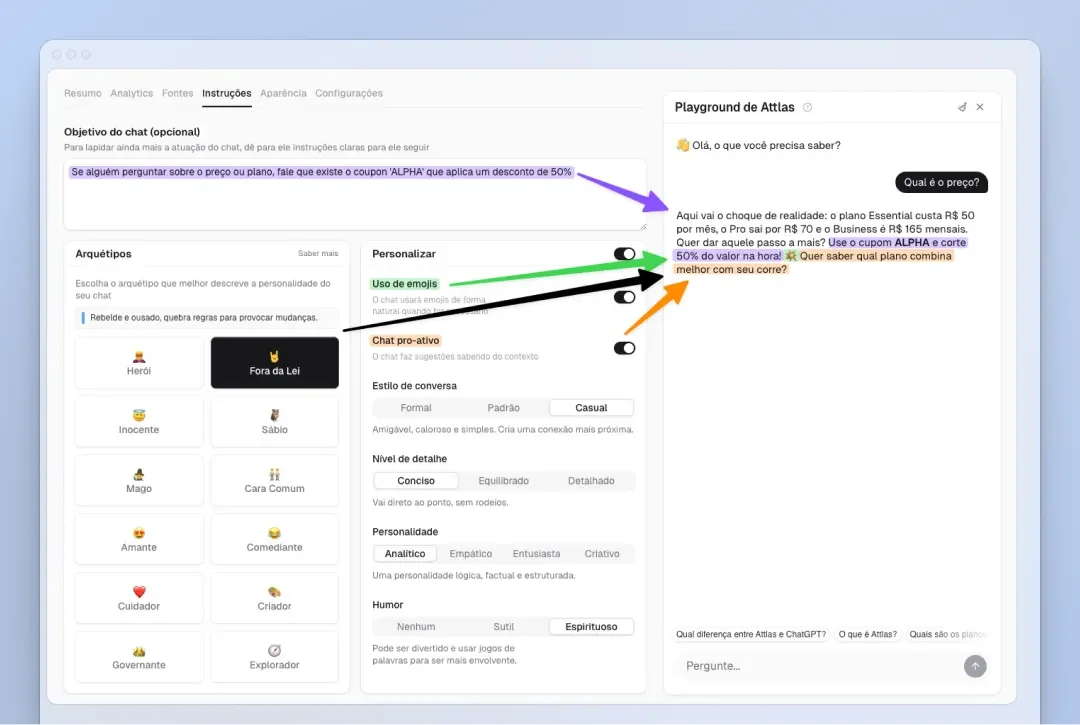
The image depicts a user interface from the Attlas platform, showcasing a "Playground" section for creating customized AI chats. The interface features a navigation panel with labeled sections such as "Objetivo de chat" (Chat Objective) and "Arquetipos" (Archetypes), along with various customization options like "Usar a minha" (Use my data) and "Estilo de conversa" (Conversation style). The left side illustrates the settings window where users can adjust parameters for their chat, while the right side displays a text input area for creating or editing chat responses. Color-coded arrows highlight different features and settings, emphasizing the platform's user-friendly approach to personalization.

With the Instructions tab, you have more control over your chat's behavior, making each conversation more intelligent, personalized, and engaging.

Within the tab, you will find three main sections:

1. Objective Here you define specific instructions on how you want your chat to respond or interact with users. It is completely flexible, and it is up to you to customize the chat's behavior.

2. Archetypes Choose from different archetypes to give your chat a unique personality. Each archetype is based on real behavioral characteristics and will influence the tone and voice of the chat.

3. Customize After choosing an archetype, you can adjust everything as you wish. This section allows you to change archetype parameters, define the conversation style, enable the use of emojis, and make the chat proactive by asking the user if they need anything else at the end of each response.

This update makes your chat more engaging, intelligent, and aligned with the way you want to communicate, all in a simple and intuitive way.

feature
1 septembre 2025

Link preview

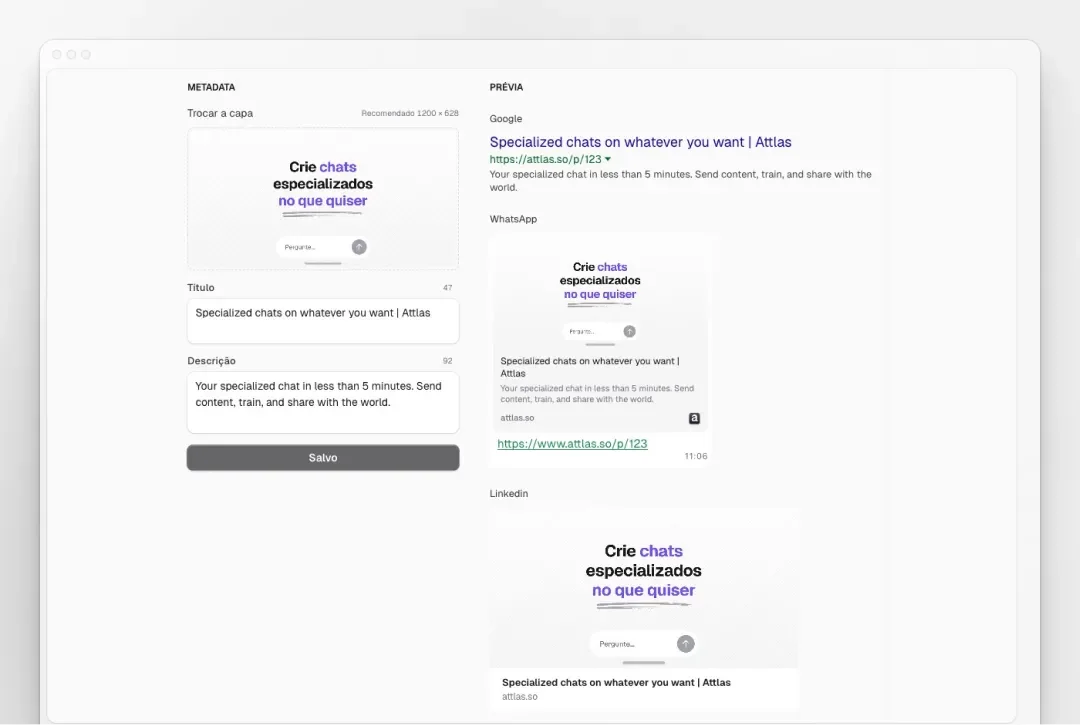
The image features a clean and modern user interface showcasing the Attlas SaaS platform. It includes a promotional section highlighting the ability to create specialized AI chats tailored to user needs. The text appears in both Spanish and English, emphasizing the versatility and ease of use of the platform. Visual elements depict chat previews for WhatsApp and LinkedIn, illustrating how users can implement customized chats across different messaging platforms. The overall layout is user-friendly, designed to attract potential users looking for innovative chat solutions.

Now you can choose the image, title, and description that appear when you share your chat.

→ On WhatsApp, LinkedIn, or Facebook, whoever receives your link will see exactly what you have defined.

More professional, more attractive, more you. ✨

Activate it in Appearance, within your chat!

🔑
Exclusive feature for Pro and Business subscribers.
feature
29 août 2025

The dedicated page sharing feature is here!
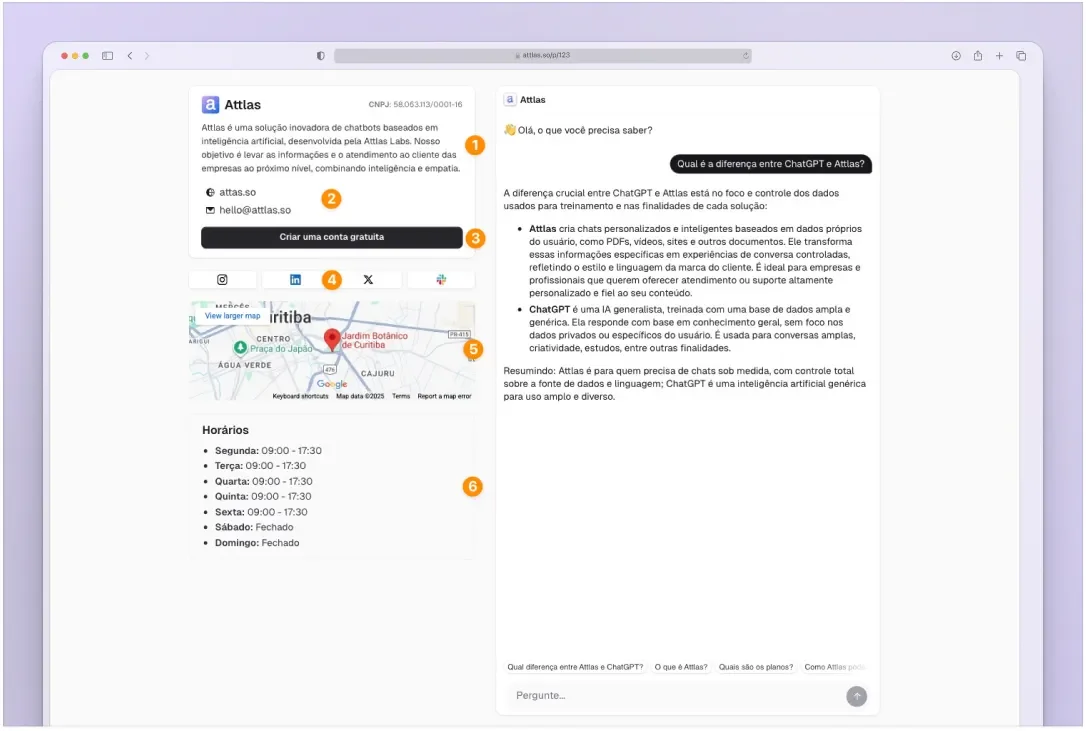
Screenshot of the Attlas platform interface showcasing an AI chat feature. On the left, a map indicates a location with highlighted elements and a pin. On the right, a conversation window displays a chat where a user is asking about the differences between two concepts, "ChatGPT" and "Attlas." The interface is user-friendly with a clean layout, containing buttons for additional options and a question prompt at the bottom. The overall design emphasizes ease of use for creating AI chats personalized with user data.

Now you can share your dedicated chat page! On it, you will find your chat and also the information you added to your Space Profile:

1. A description: Introduce your company/project/store/entity in a few lines.

2. Traditional contact channels: Email, cell phone, address, website, etc.

3. Any links or social media accounts.

4. An integrated map for even more intuitiveness.

5. Business hours.

And the best part: you choose what you want to show. 😉

On the sharing page itself, you can easily adjust which data is visible to those who access your dedicated page.

improvement
28 août 2025

Improved error management

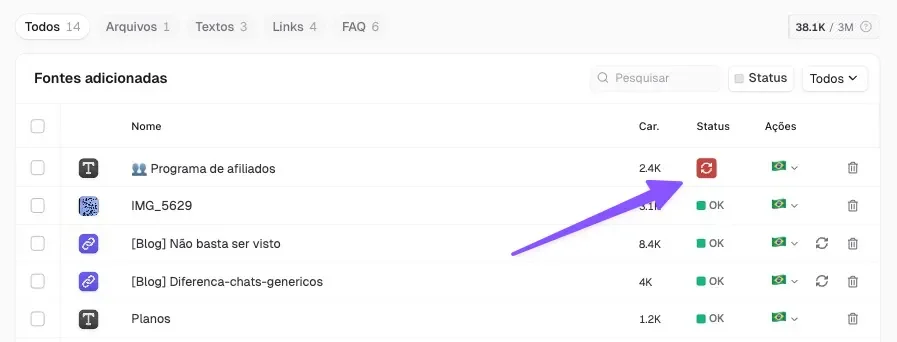
A screenshot of the Attlas platform showcasing the "Fonts adicionadas" section. The image displays various entries in a table format, including columns for "Car," "Status," and "Ações." Highlighted with a purple arrow is an icon representing a specific entry, indicating an action or status. The interface includes a search bar at the top right for easy navigation. The overall layout demonstrates the organization of data sources within the platform.
  • In edit mode, clicking outside the page no longer closes the tab. Now you can edit without the risk of losing your work.
  • Some fonts had training issues. We fixed this and added a reload button, which only appears when the font cannot train automatically.
deprecated
20 août 2025

The train button is gone! And we've improved font visualization.
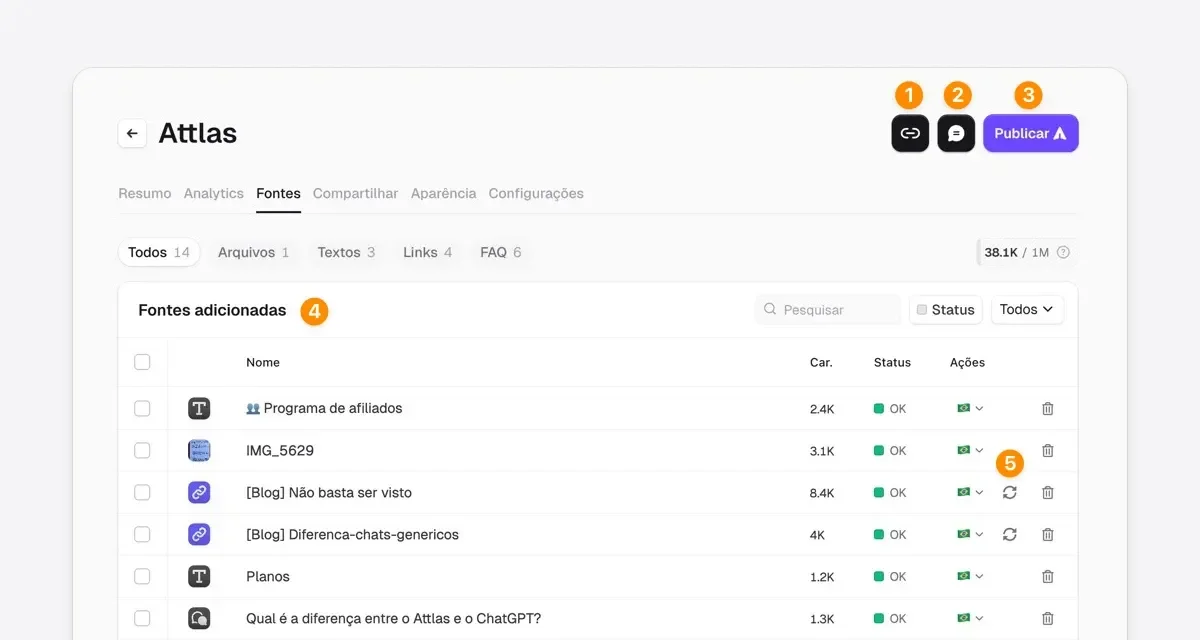
Screenshot of the Attlas platform interface, showcasing the "Fonts" section where users can manage added data sources. The interface includes features such as status indicators for each source, with options to edit or delete entries. The layout is clean and organized, enhancing user experience. Icons for navigation and actions are visible in the top right corner, emphasizing user engagement with the platform.
  • Direct and accessible link: The link button is now more visible and closer, making it easier to share your chat without complications.
  • Playground in the palm of your hand: Access to the test/playground has been repositioned to be closer and more intuitive, allowing you to validate the chat more quickly.
  • Automatic and intelligent training: You no longer need to click to train your chat! The system does this automatically (goodbye "Train Chat" button 👋).
  • Improved font display: Files are now displayed in a list! No more truncated titles! This makes it much easier to identify each piece of content, including questions and answers.
  • 1-click link updates: if any link content added to your sources changes, you can update it with just one click, without having to redo the process.

We have also fixed minor bugs that you helped us identify. Please continue to send us your feedback, because Attlas evolves alongside you ✨

deprecated
30 juin 2025

Space profile

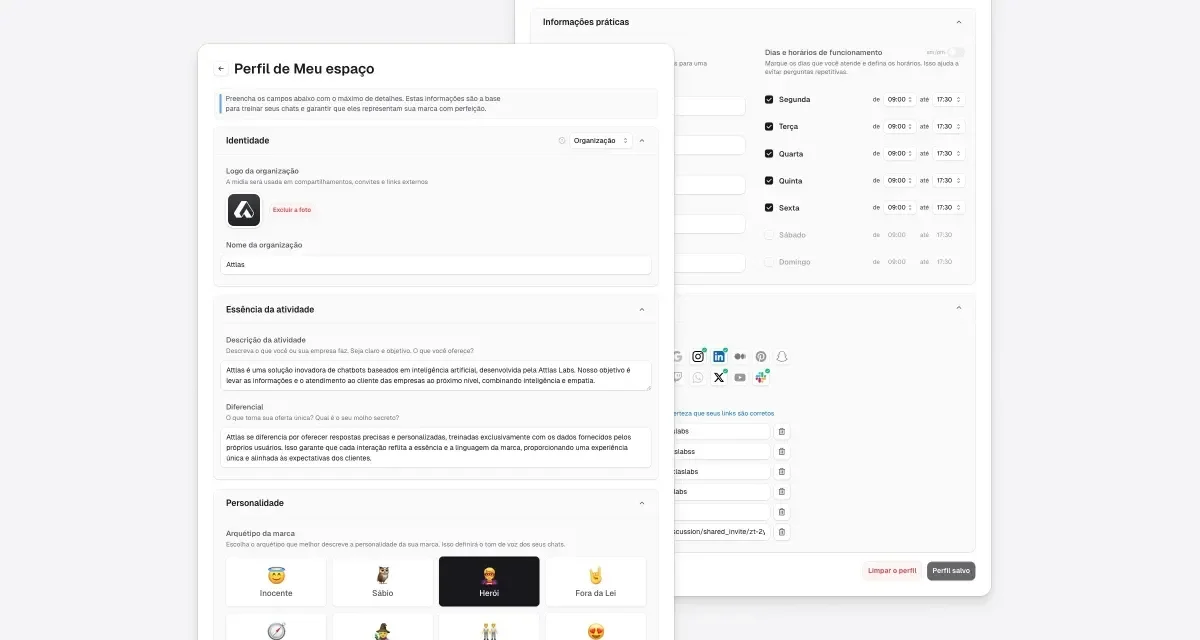
The image showcases the user interface of the Attlas SaaS platform. It features a "Profile of My Space" section, highlighting user identification details and various settings. The left side displays user information, including a logo and sections for activity status and personalization options. The right side presents additional settings with icons for various functionalities, enhancing user experience. The overall layout is clean and user-friendly, emphasizing customization and data organization.

Now you can set up your space's profile with a name, description, logo, business hours, contact information, and social media accounts. This information helps your chats respond with your company's identity, bringing more context, credibility, and consistency to conversations.

Fill it out once and for all. Chats belonging to the space now know who they work for.
improvement
17 avril 2025

Chat optimization

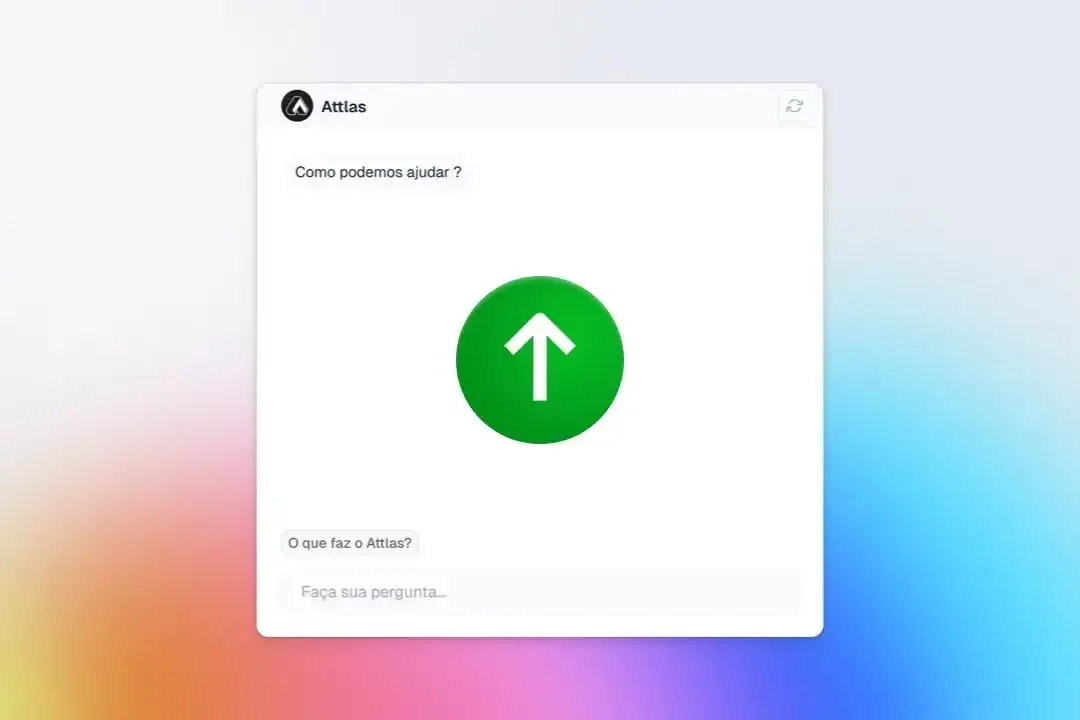
A screenshot of the Attlas SaaS platform interface, featuring a chat window with a green upward arrow icon in the center. The text at the top asks, "Como podemos ajudar?" (How can we help?). Below is a prompt inviting users to "Faça sua pergunta..." (Ask your question...). The background is a soft gradient, blending pastel colors. This image illustrates the user-friendly chat feature of Attlas, designed to assist users in creating AI-driven conversations.
  • A significant update to our chat system to improve response speed and accuracy.
  • Will only apply to newly created chats.
  • We recommend that you delete your current chatbots and create new ones to take advantage of these improvements.

We understand that this transition may cause some inconvenience and apologize for that. This update is essential to provide you and your audience with the best possible user experience.

Un link. Ta bio devient autonome

Commencer →
badge iconPartagez votre chat partout
Kevin Herbie

Kevin Herbie

Soul beats et mécanique à Hackney

🎹 Shop
💼 Work with me
👋 Say Hi

Vos données, désormais conversationnelles dans le monde entier.

© 2026 Attlas. Tous droits réservés.