> ## Documentation Index
> Fetch the complete documentation index at: https://attlas.so/docs/llms.txt
> Use this file to discover all available pages before exploring further.
# Shop and products
> Showcase products, merchandise, and digital goods directly in your chat with a dedicated store layout.
The **Shop** tab allows you to showcase merchandise, physical items, digital products, and services directly inside your chat.
When you add products, Attlas presents them in a dedicated 2-column store layout that makes browsing and purchasing seamless for your visitors.
To manage your catalog, navigate to the **"Triggers"** page and switch to the **"Shop"** tab.
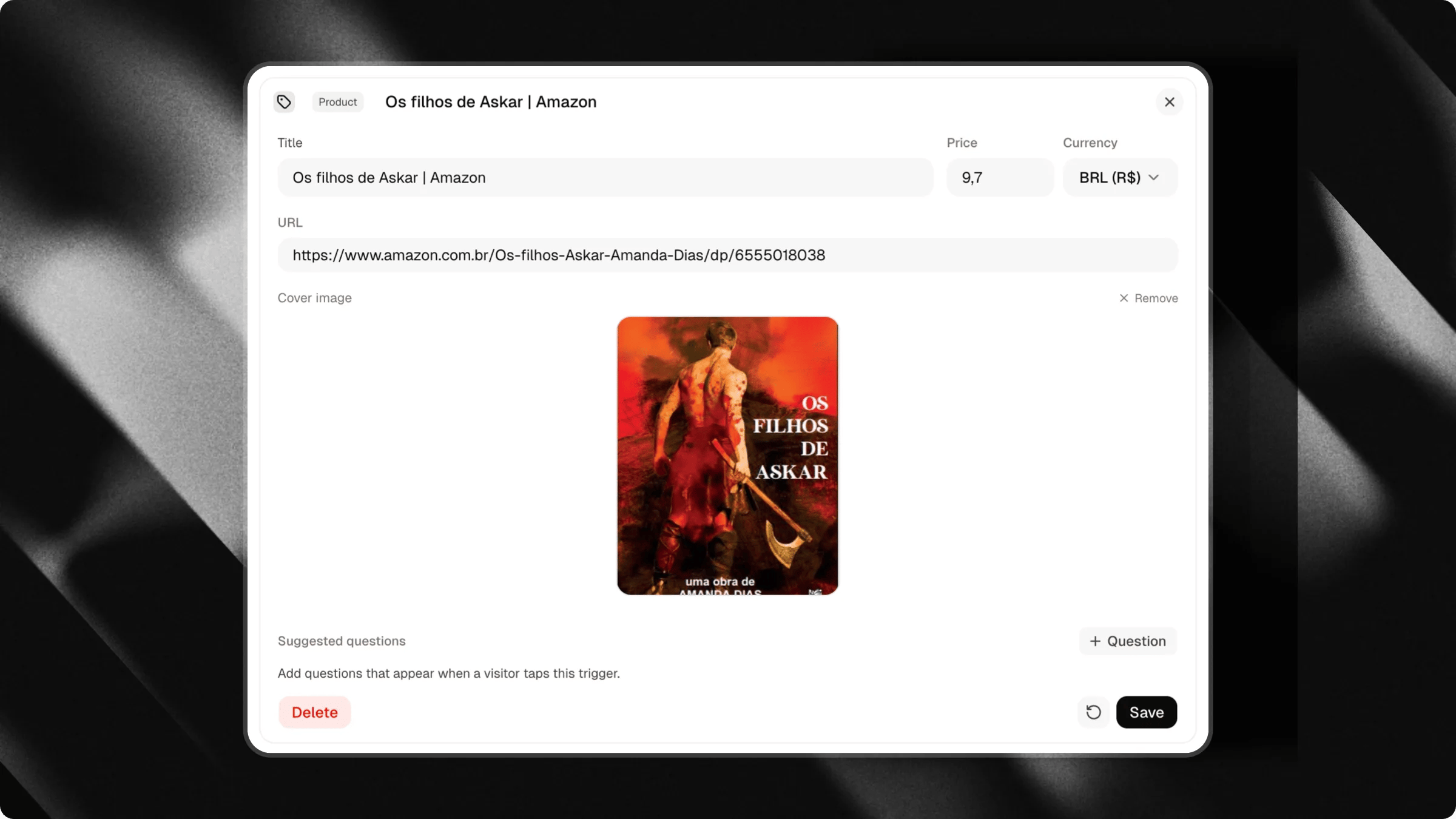 ## Setting up a product
Each product trigger includes:
* **Cover image**: High-quality visual showcasing your item.
* **Product title**: Clear and concise name for the item.
* **Price and currency**: Amount and currency code (supporting USD, EUR, GBP, BRL, CAD, JPY, and more).
* **Destination URL**: Outbound link pointing directly to your checkout page, online store, or payment processor (e.g. Stripe, Shopify, Gumroad).
**Automatic currency display**: When visitors browse your chat in their preferred language, Attlas automatically converts and displays the equivalent price in their local currency.
***
## Links and Shop tabs
In your chat settings, your triggers are organized across tabs:
1. **Links & Media**: For your links, cards, embeds, and contact shortcuts.
2. **Shop**: For your products and store collections.
3. **Questions**: For suggested conversation starters.
When you have at least one product in your Shop, Attlas automatically adds a **Links / Shop switcher** at the top of your public chat. Visitors can easily toggle between your general links and your store items.
***
## Organizing with sections
You can add **Section** dividers in your Shop tab to categorize your products (e.g. "Apparel", "E-books", "Accessories", "Courses").
Section headers in the Shop tab automatically span across both columns of the product grid to keep your catalog clean and easy to browse.
***
## Best practices
* **High-resolution images**: Use clean, well-lit photos with consistent aspect ratios for a professional storefront look.
* **Direct checkout links**: Link directly to the specific product checkout or cart URL to minimize friction for the buyer.
* **Descriptive titles**: Keep product titles short so they fit neatly on mobile screens.
Guide visitors and spark conversations with curated prompts and AI-generated questions.
## Setting up a product
Each product trigger includes:
* **Cover image**: High-quality visual showcasing your item.
* **Product title**: Clear and concise name for the item.
* **Price and currency**: Amount and currency code (supporting USD, EUR, GBP, BRL, CAD, JPY, and more).
* **Destination URL**: Outbound link pointing directly to your checkout page, online store, or payment processor (e.g. Stripe, Shopify, Gumroad).
**Automatic currency display**: When visitors browse your chat in their preferred language, Attlas automatically converts and displays the equivalent price in their local currency.
***
## Links and Shop tabs
In your chat settings, your triggers are organized across tabs:
1. **Links & Media**: For your links, cards, embeds, and contact shortcuts.
2. **Shop**: For your products and store collections.
3. **Questions**: For suggested conversation starters.
When you have at least one product in your Shop, Attlas automatically adds a **Links / Shop switcher** at the top of your public chat. Visitors can easily toggle between your general links and your store items.
***
## Organizing with sections
You can add **Section** dividers in your Shop tab to categorize your products (e.g. "Apparel", "E-books", "Accessories", "Courses").
Section headers in the Shop tab automatically span across both columns of the product grid to keep your catalog clean and easy to browse.
***
## Best practices
* **High-resolution images**: Use clean, well-lit photos with consistent aspect ratios for a professional storefront look.
* **Direct checkout links**: Link directly to the specific product checkout or cart URL to minimize friction for the buyer.
* **Descriptive titles**: Keep product titles short so they fit neatly on mobile screens.
Guide visitors and spark conversations with curated prompts and AI-generated questions.