> ## Documentation Index
> Fetch the complete documentation index at: https://attlas.so/docs/llms.txt
> Use this file to discover all available pages before exploring further.
# Link aggregator
> Bring your links, content and conversations together in a single experience.
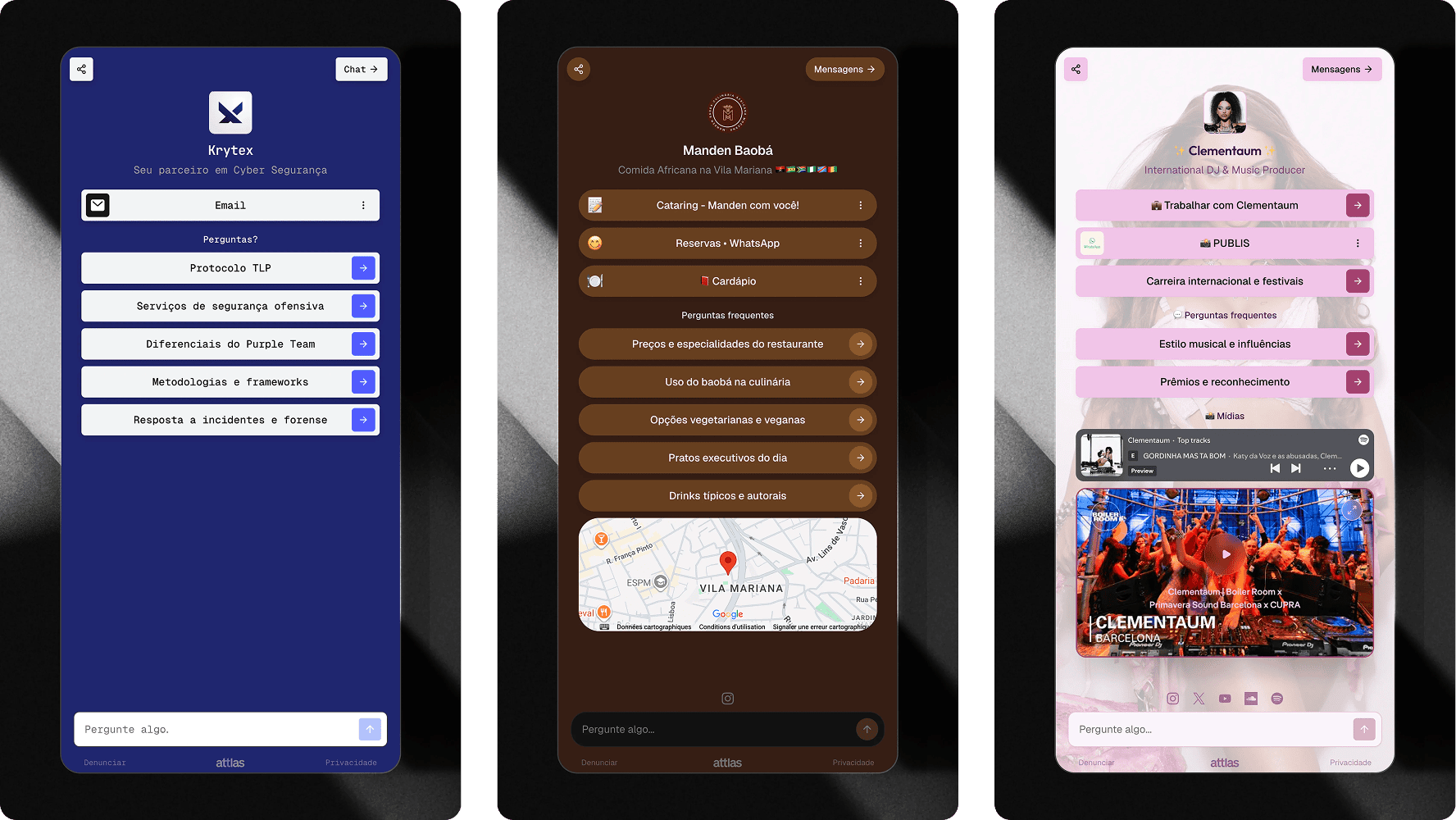
The **Attlas link aggregator** allows you to bring together your most important links, content and channels in a single shareable page.
It works as an alternative to traditional link-in-bio platforms, but with one major difference: in addition to your links, you can also provide an intelligent chat trained on your own content.
This means your visitors don't just click links. They can ask questions, discover information and interact directly with your knowledge base.
***
## What can you add to your home view (link aggregator) ?
The link aggregator can be used to centralize all your most important channels and resources.
**Here the link types available into Attlas:**
* Social media profiles
* Websites and blogs
* Landing pages
* Products and services
* Portfolios
* Videos
* Files
* Forms
* Exclusive content
All organized in a single page that is easy to share.
***
## Links and actions
The buttons displayed in your link aggregator are managed through **triggers**.
**You can add:**
* External links
* Files
* Google Drive files
* YouTube videos
* Spotify embed
* Location maps
* Questions that start conversations
 To learn more about the available trigger types, visit the **triggers** section of the documentation.
***
## Integrated chat
One of the biggest differences between the Attlas link aggregator and a traditional link aggregator is the built-in intelligent chat.
While other platforms simply redirect users to external pages, Attlas allows visitors to interact directly with your content.
Users can:
* Ask questions
* Request information
* Discover products and services
* Find documents and resources
* Explore your content through conversations
All without leaving the page.
Learn about Atlas' AI chat and how it works.
***
## When should you use link aggregator?
The link aggregator is ideal for:
* Content creators
* Influencers
* Educators
* Businesses
* Consultants
* Freelancers
* Personal brands
Anyone who needs to share multiple resources and make information easier to access can benefit from this feature.
***
## Sharing your link aggregator
Once your page is configured, simply share your chat link.
You can use it as the **link in your social media bios**, including:
* Instagram
* TikTok
* LinkedIn
* X (Twitter)
* WhatsApp
* Email
* QR Codes
* Websites and blogs
Your link aggregator is automatically updated whenever you add new triggers, content, or information to your chat.
***
## More than a link page
The link aggregator transforms a simple link page into a conversational experience.
In addition to organizing your most important resources in one place, it allows visitors to find exactly what they are looking for through an intelligent conversation powered by your own knowledge.
To learn more about the available trigger types, visit the **triggers** section of the documentation.
***
## Integrated chat
One of the biggest differences between the Attlas link aggregator and a traditional link aggregator is the built-in intelligent chat.
While other platforms simply redirect users to external pages, Attlas allows visitors to interact directly with your content.
Users can:
* Ask questions
* Request information
* Discover products and services
* Find documents and resources
* Explore your content through conversations
All without leaving the page.
Learn about Atlas' AI chat and how it works.
***
## When should you use link aggregator?
The link aggregator is ideal for:
* Content creators
* Influencers
* Educators
* Businesses
* Consultants
* Freelancers
* Personal brands
Anyone who needs to share multiple resources and make information easier to access can benefit from this feature.
***
## Sharing your link aggregator
Once your page is configured, simply share your chat link.
You can use it as the **link in your social media bios**, including:
* Instagram
* TikTok
* LinkedIn
* X (Twitter)
* WhatsApp
* Email
* QR Codes
* Websites and blogs
Your link aggregator is automatically updated whenever you add new triggers, content, or information to your chat.
***
## More than a link page
The link aggregator transforms a simple link page into a conversational experience.
In addition to organizing your most important resources in one place, it allows visitors to find exactly what they are looking for through an intelligent conversation powered by your own knowledge.