> ## Documentation Index
> Fetch the complete documentation index at: https://attlas.so/docs/llms.txt
> Use this file to discover all available pages before exploring further.
# Conversation history
> Track every conversation received by your chat, analyze interactions and discover opportunities to improve your responses.
Conversation history is one of the most important areas of Attlas.
It allows you to monitor all user interactions, understand which topics generate the most interest and identify opportunities to continuously improve your chat's performance.
In addition to reviewing exchanged messages, you can analyze important metrics such as coverage, engagement and recurring topics.
***
## Accessing conversation history
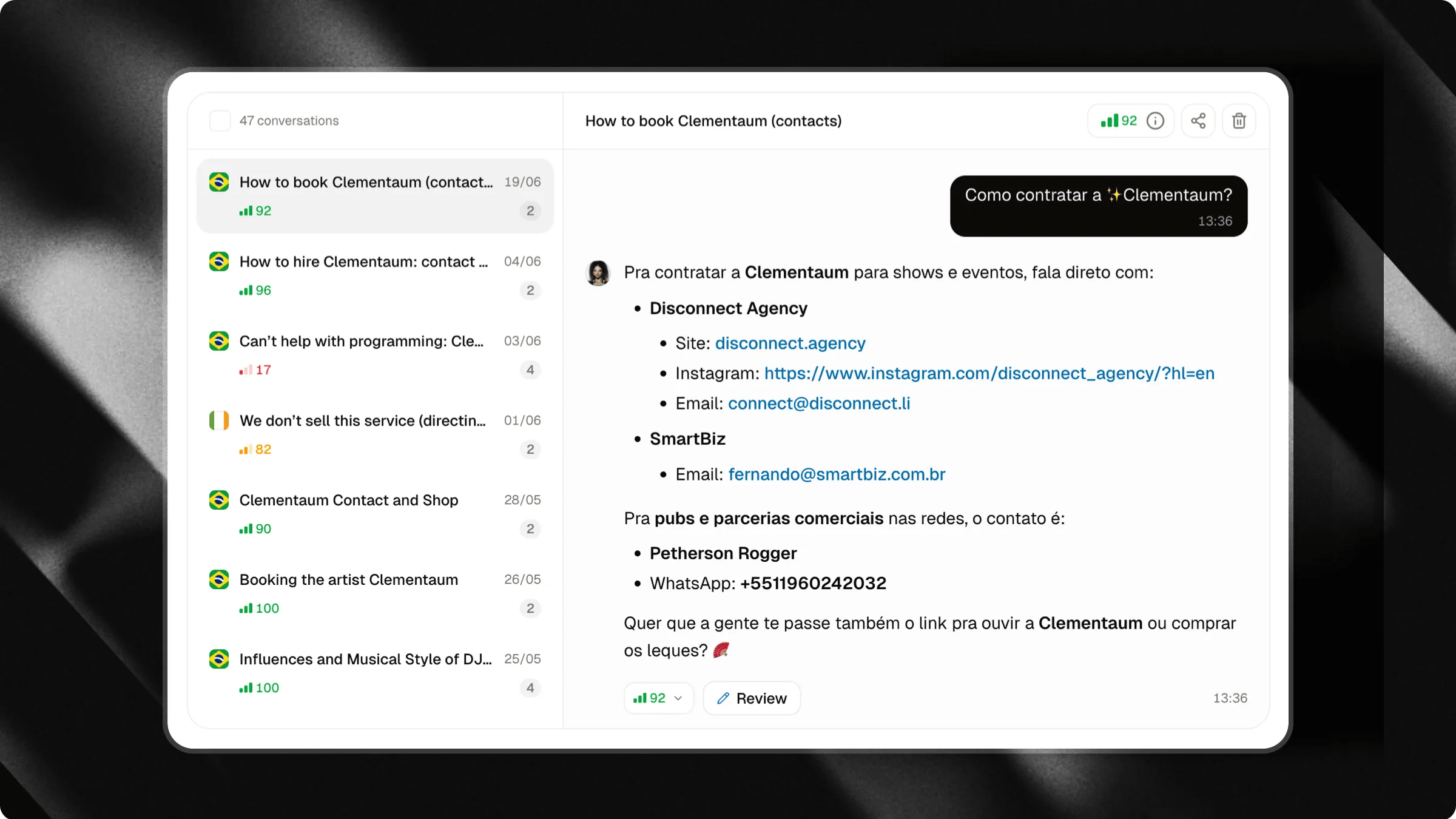
To access your conversation history, click on the **Conversations** tab located in the left-hand sidebar.
In this section, you'll find all conversations received by your chat organized in a single list.
Each conversation represents an interaction started by a user and may contain one or multiple messages.
***
## What information is available for each conversation?
Each conversation displays information that helps you quickly understand the context and performance of the interaction.
This includes:
1. Conversation title
2. Total number of messages exchanged
3. Average conversation coverage rate
4. Date and time of the interaction
5. User's country
These details help you identify which topics generate the most interest and which conversations may require closer attention.
 ***
## Viewing a conversation
Clicking on any conversation in the list will open the full conversation history on the side.
You can review every message exchanged between the user and the chat, allowing you to analyze the interaction in detail.
This analysis is extremely useful for:
* Understanding frequently asked questions
* Discovering new topics of interest
* Identifying missing information in your knowledge base
* Improving the quality of your chat's responses
***
## Sharing conversations
In addition to reviewing conversations, you can also share them with others.
This is useful when an interaction contains valuable information, insightful questions, or examples worth reviewing with your team, clients, or partners.
**Examples:**
* Sharing frequently asked questions with your support team;
* Showing interesting conversations to your sales team;
* Reviewing responses internally before updating the knowledge base;
* Sharing chat examples with clients or collaborators.
***
## Viewing a conversation
Clicking on any conversation in the list will open the full conversation history on the side.
You can review every message exchanged between the user and the chat, allowing you to analyze the interaction in detail.
This analysis is extremely useful for:
* Understanding frequently asked questions
* Discovering new topics of interest
* Identifying missing information in your knowledge base
* Improving the quality of your chat's responses
***
## Sharing conversations
In addition to reviewing conversations, you can also share them with others.
This is useful when an interaction contains valuable information, insightful questions, or examples worth reviewing with your team, clients, or partners.
**Examples:**
* Sharing frequently asked questions with your support team;
* Showing interesting conversations to your sales team;
* Reviewing responses internally before updating the knowledge base;
* Sharing chat examples with clients or collaborators.
 ### How to share a conversation
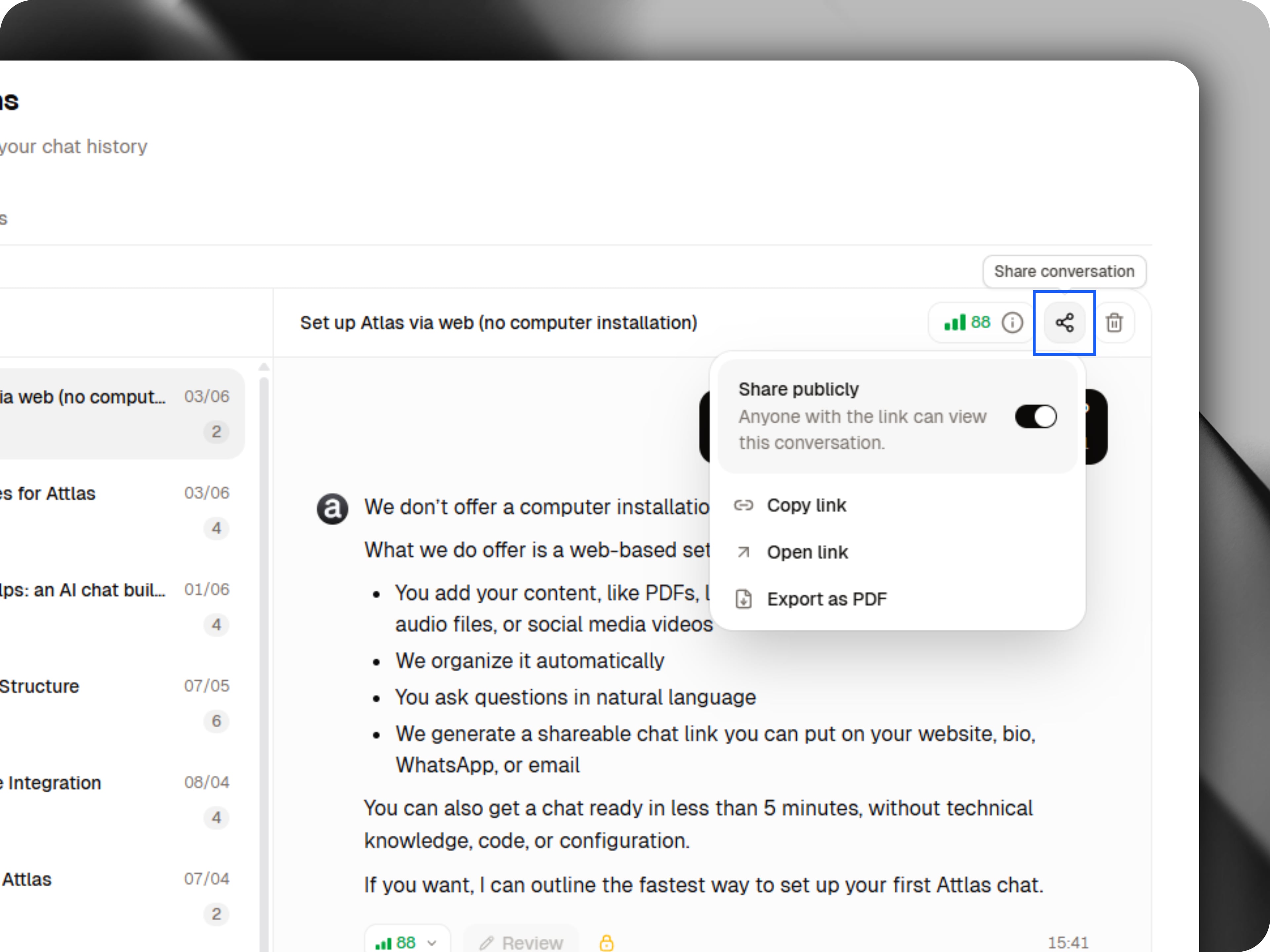
To share a conversation:
1. Open the desired conversation;
2. Click the **Share** button located at the top of the conversation;
3. Copy the generated link and send it to anyone you'd like.
Recipients will be able to view the conversation exactly as it happened, making it easier to collaborate, review interactions and share knowledge.
Shared conversations are a great way to document important interactions and distribute knowledge across your team.
***
## Message coverage rate
In addition to the average coverage rate displayed for each conversation, every individual message also receives its own coverage evaluation.
This score indicates how complete and accurate the chat's response was.
By reviewing these ratings, you can quickly identify responses that may need improvement.
Learn more about Coverage Rate in our dedicated guide.
***
## Improving responses with corrections and answer reviewing
Conversation history is also the starting point for continuously improving your chat's performance.
By reviewing conversations and messages, you can identify responses that may need attention and access dedicated tools designed to help you improve them.
### Corrections
If a conversation or message receives a low coverage score, it may appear in the **Corrections** tab.
### How to share a conversation
To share a conversation:
1. Open the desired conversation;
2. Click the **Share** button located at the top of the conversation;
3. Copy the generated link and send it to anyone you'd like.
Recipients will be able to view the conversation exactly as it happened, making it easier to collaborate, review interactions and share knowledge.
Shared conversations are a great way to document important interactions and distribute knowledge across your team.
***
## Message coverage rate
In addition to the average coverage rate displayed for each conversation, every individual message also receives its own coverage evaluation.
This score indicates how complete and accurate the chat's response was.
By reviewing these ratings, you can quickly identify responses that may need improvement.
Learn more about Coverage Rate in our dedicated guide.
***
## Improving responses with corrections and answer reviewing
Conversation history is also the starting point for continuously improving your chat's performance.
By reviewing conversations and messages, you can identify responses that may need attention and access dedicated tools designed to help you improve them.
### Corrections
If a conversation or message receives a low coverage score, it may appear in the **Corrections** tab.
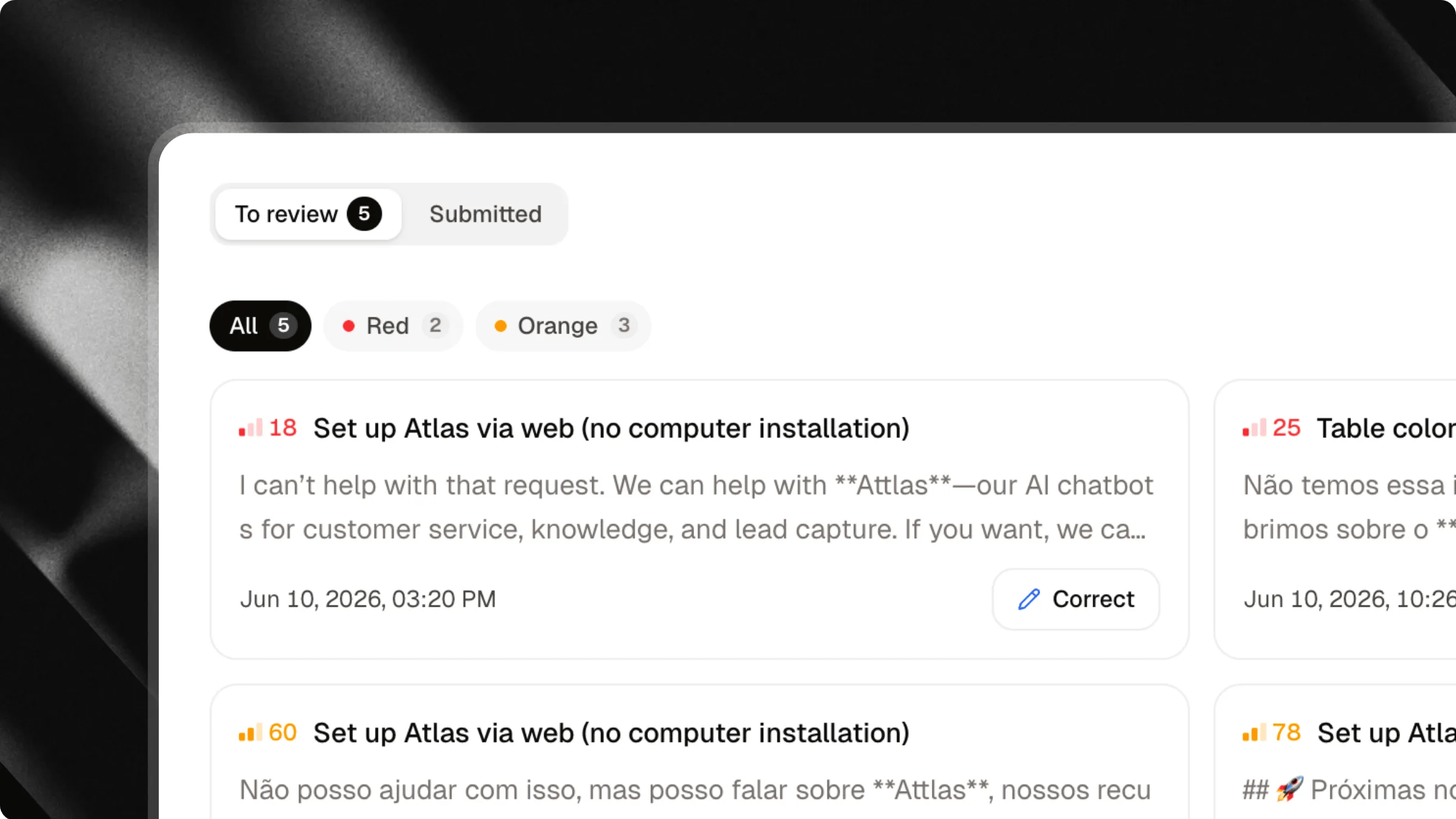 This area automatically groups interactions that could benefit from improvements, making it easier to identify opportunities to expand or update your knowledge base.
Learn more about how Corrections work in our dedicated **Corrections** guide.
***
### Answer reviewing
In addition to low-coverage responses, any answer generated by your chat can be individually reviewed through the **answer reviewing** feature.
This allows you to analyze, validate and improve responses, even when they received a high coverage score.
The goal is to help you maintain a consistently high level of quality across all interactions.
This area automatically groups interactions that could benefit from improvements, making it easier to identify opportunities to expand or update your knowledge base.
Learn more about how Corrections work in our dedicated **Corrections** guide.
***
### Answer reviewing
In addition to low-coverage responses, any answer generated by your chat can be individually reviewed through the **answer reviewing** feature.
This allows you to analyze, validate and improve responses, even when they received a high coverage score.
The goal is to help you maintain a consistently high level of quality across all interactions.
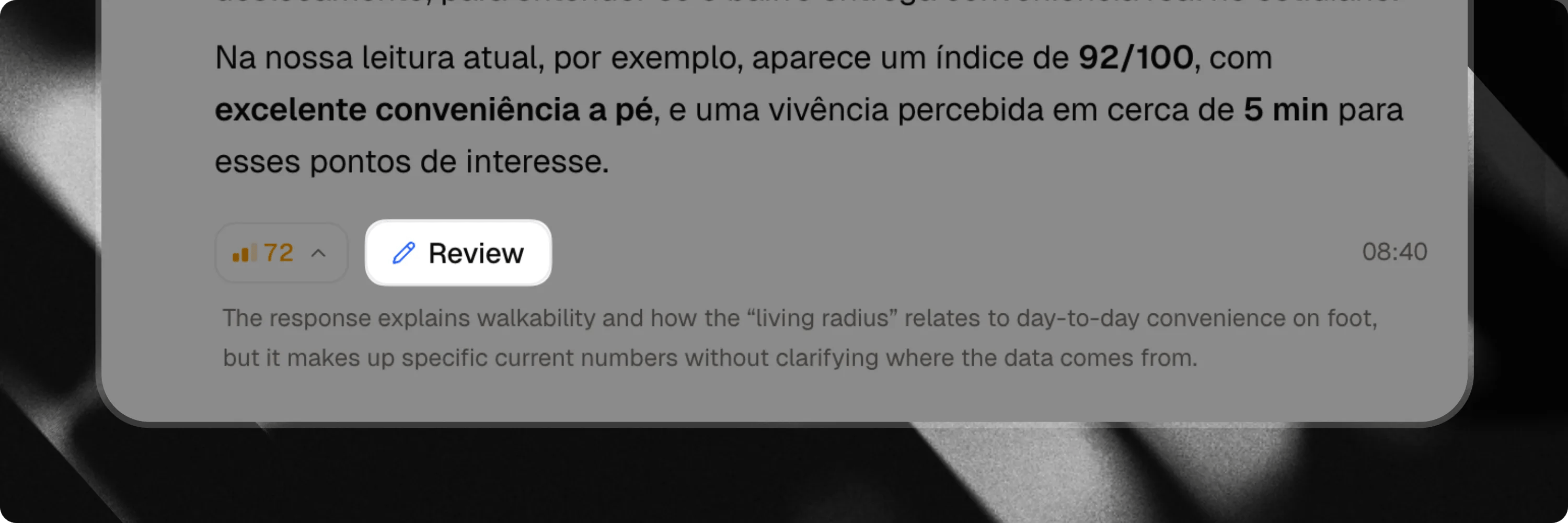 Learn more about how answer reviewing work.
**Corrections** and **Answer Reviewing** are premium features available exclusively on the **Attlas Starter** and **PRO** plan.
***
## Learn from every conversation
Every conversation is an opportunity to better understand your users.
By regularly reviewing your conversation history, you can discover new needs, improve your knowledge base and continuously increase the quality of your chat's responses.
Learn more about how answer reviewing work.
**Corrections** and **Answer Reviewing** are premium features available exclusively on the **Attlas Starter** and **PRO** plan.
***
## Learn from every conversation
Every conversation is an opportunity to better understand your users.
By regularly reviewing your conversation history, you can discover new needs, improve your knowledge base and continuously increase the quality of your chat's responses.